What is a Caste Certificate (जाति प्रमाण पत्र)?
A Caste Certificate (CC) is an official document issued by the Bihar Government under RTPS (Right To Public Service Act) Service that verify an individual belong to specific caste or community. This document is essential for students and job seekers in Bihar who belong to Reserved Categories (SC, ST, EBC, BC) to access government schemes, educational scholarships, age relaxations, and reserved quotas in state and central government jobs.
In this guide, we will walk you through exactly what documents you need, the step-by-step online application process at serviceonline.bihar.gov.in so your application doesn’t get rejected.
Documents Required for RTPS Bihar Caste Certificate (2026 Update)
Important Update for 2026: To prevent fraudulent applications, the RTPS portal now requires strict authentic documents. Applications without proper document will be rejected immediately.
1. Identity Proof (Upload Any One)
- Aadhaar Card
- PAN Card
- Voter ID Card
- Passport, etc
2. Land & Ancestral Proof (New Rule 2026)
When applying for a caste certificate, you have several options for the proof you need to submit.
- Revenue Record – Khatiyan (Land Record Register)
If there is a land document (Khatiyan) in the name of your father or ancestors, you can use that. - Revenue Record – Gift Deed
If your father or ancestors received land as a gift, you can submit the deed of gift (Dan Patra). - Revenue Record – Land-related Documents
You can upload any paperwork related to your ancestors’ land, like a land tax receipt or a sale deed (Kewala). Just select the matching option on the form. - Revenue Record – Records related to land allotted to landless persons
If you are landless but were allotted land by the government, documents related to that allotted land will work. - Other Revenue Records
Any other official revenue records you have can also be submitted. - Request for site inspection in case revenue records are not available
A lot of people, like daily wage laborers, might not own any land or maybe the land they live on isn’t officially registered in their name or their ancestors’ names. If you literally have nothing to show, there is a workaround. You can select the option that says: Request for on-site inspection in the absence of revenue records. If you pick this, you don’t have to upload any land documents. Instead, a physical verification process will take place.
3. Basic Requirements
- A recent passport-sized photograph (under 300 KB).
- Your active registered mobile number and email ID.
- And other supporting document (under 2 Mb).
Apply Online: caste Certificate
How to Apply Caste Certificate Online in Bihar via RTPS?
Here is the step-by-step process to apply online for a Bihar Caste Certificate based on the latest guidelines:
Step 1: Access the Portal
- Open Google, search for “RTPS,” and open the official website:
serviceonline.bihar.gov.in.
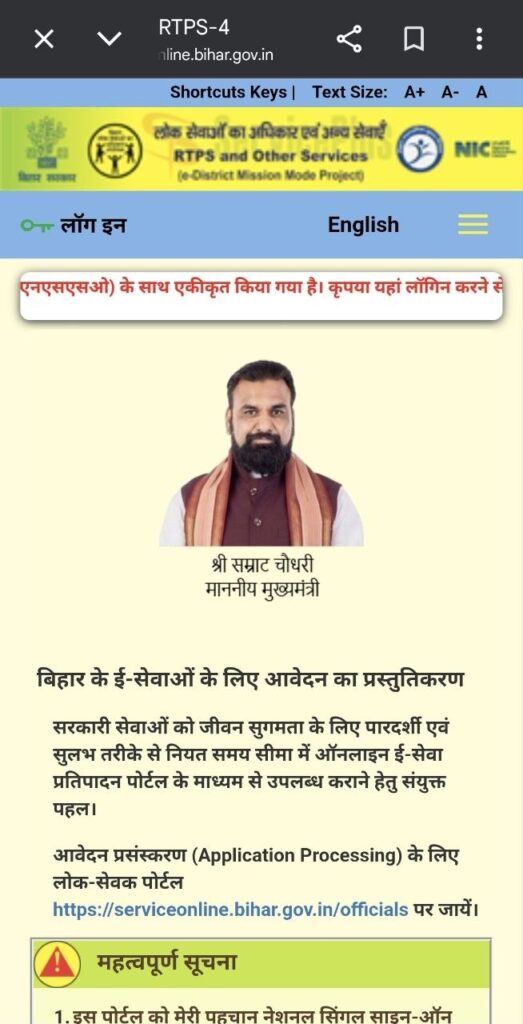
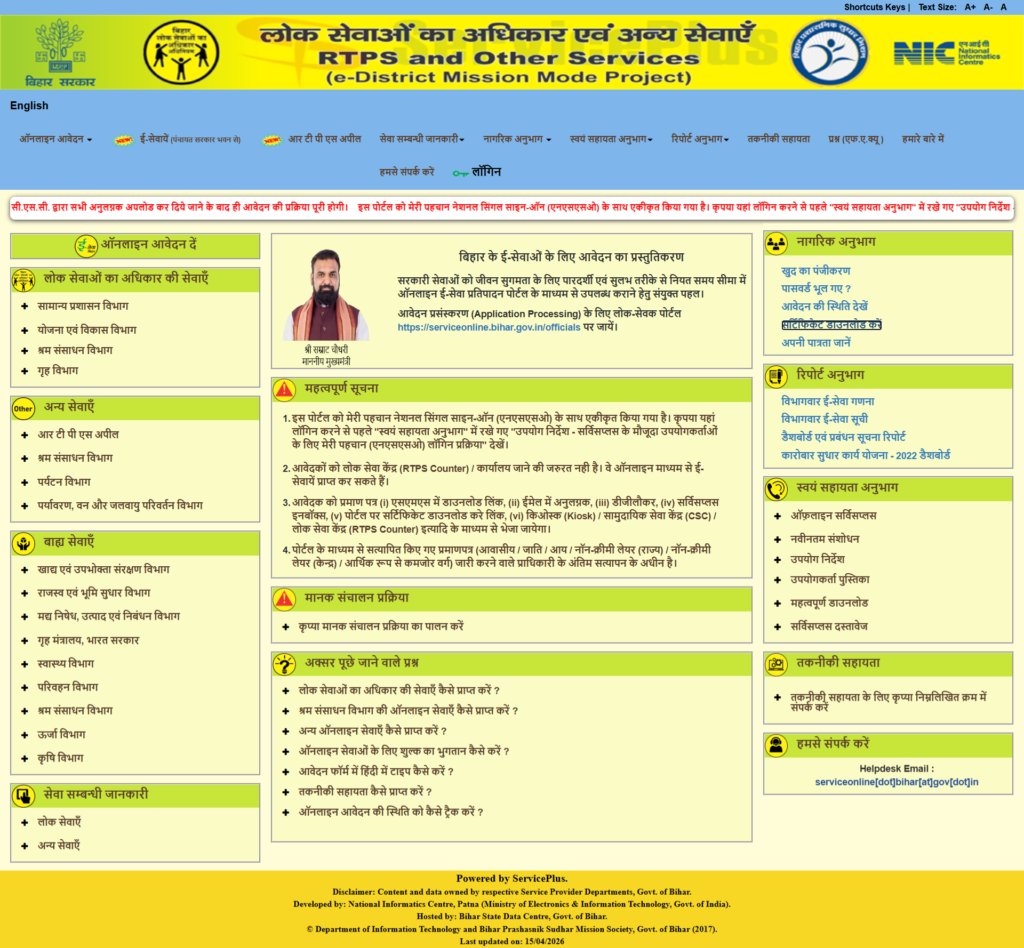
Mobile & Desktop view of RTPS serviceplus home page.
Step 2: Navigate to the Application Form
On the left-side menu, click on “Apply Online” (ऑनलाइन आवेदन दें) > “General Administration Department” (सामान्य प्रशासन विभाग)> “Issuance of Caste Certificate (जाति प्रमाण पत्र का निर्गमन) and choose “Block Level” (अंचल स्तर).
Step 3: Fill in Personal Details
- Select your gender and type your full name (it will automatically convert to Hindi).
- Enter your father’s name, mother’s name, and husband’s name (if applicable).
- Enter your valid mobile number, click anywhere outside the box to receive an OTP, and then enter and validate the OTP.
- Enter your Email ID.
Step 4: Enter Address Details
- Select your State (Bihar), District, Sub-division, and Block.
- Choose your local body type (e.g., Gram Panchayat, Nagar Parishad) and enter your Ward Number, Village, Post Office, Police Station, and PIN Code.
- If your present address is the same as your local body address, tick the corresponding checkbox.
Step 5: Photo and Occupation
- Upload a photograph of the applicant.
- Select your Occupation from the dropdown menu (options include student, government/private service, farmer, housewife, or ‘other’ if you are a laborer).
Step 6: Caste Information
- Select your Category, Caste, and Sub-caste (the exact caste code will auto-fill).
Step 7: Choose Evidence (Documentary Proof)
- You must select the type of proof you are attaching.
- You can choose land documents belonging to your ancestors (such as a Khatiyan, Kewala, rent receipt, or land allotted to the landless).
- If you do not have any land documents, you can select the option for a “site inspection due to unavailability of revenue records”.
Step 8: Review the Form
- Enter the Captcha code and click Proceed.
- A preview of your application will appear. Carefully review all the details. If anything is wrong, use the ‘Edit‘ option; if everything is correct, proceed to attach your documents.
Step 9: Upload Documents
- ID Proof: Upload a valid ID such as an Aadhaar Card or Voter ID.
- Address/Land Proof: If you chose to submit land documents, upload that specific file (like the Jamabandi Panji) here. If you chose the “site inspection” option, you will only need to upload your ID proof.
Step 10: Final Submission
- Save your documents and check the final preview.
- Click Submit.
- Your form is now successfully submitted. Make sure to print or save the acknowledgement receipt.
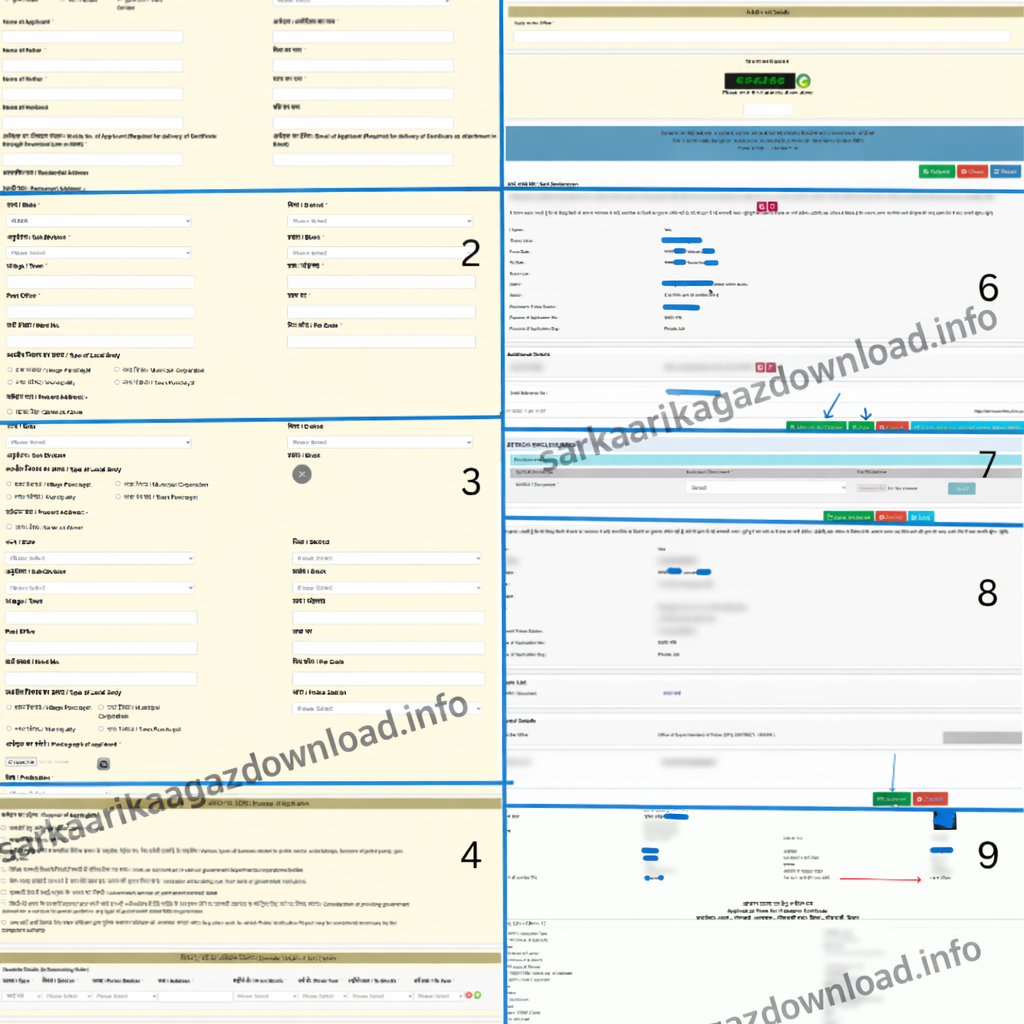
Processing Time
It usually takes 10 working days to process your application.
Validity Period
There is no fixed validity period for a caste certificate. However, if there is any change in your caste or religion, you should get it updated accordingly.
For many government schemes and job applications, a recently issued certificate is required—usually within the last 1–2 years. So, you may need to apply for a new one based on those specific requirements.
If your certificate is older than 6 months or 1 year, it’s better to apply for a fresh one.
So, in simple terms, you can consider 6 months as a safe validity period for practical use.
Reasons for Rejection
- If you enter incorrect personal details that do not match the submitted documents
- If you upload blurred or unclear images/documents
- If you submit or upload the wrong documents
How to Track Application Status?
To check your application status of Bihar Caste Certificate, follow these steps on the RTPS portal:
- Visit the official website where you applied and click on the option to check application status (आवेदन की स्थिति देखें).
Under Citizen section > Track Application Status. - Enter your Application Reference Number.
- Enter the submission date (the date you applied) and fill in the captcha code, then click submit.
- The system will ask if you want to view and download your certificate; click on this option.
- Provide the applicant’s name, father’s name, and mother’s name, and click submit again.
- Your application status will appear on the screen. If your certificate is ready, the status will show as “Approved” and “Issued and Delivered”.
(Note: If your application was rejected, the reason will be clearly mentioned in the “Remarks” section so you can correct it and reapply).
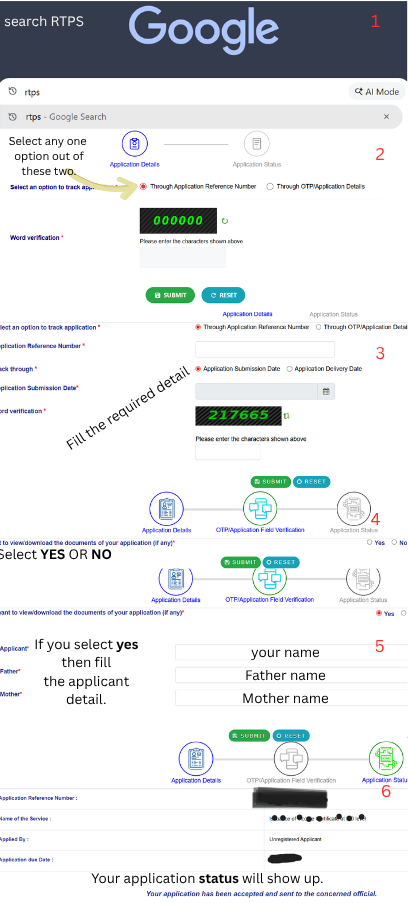
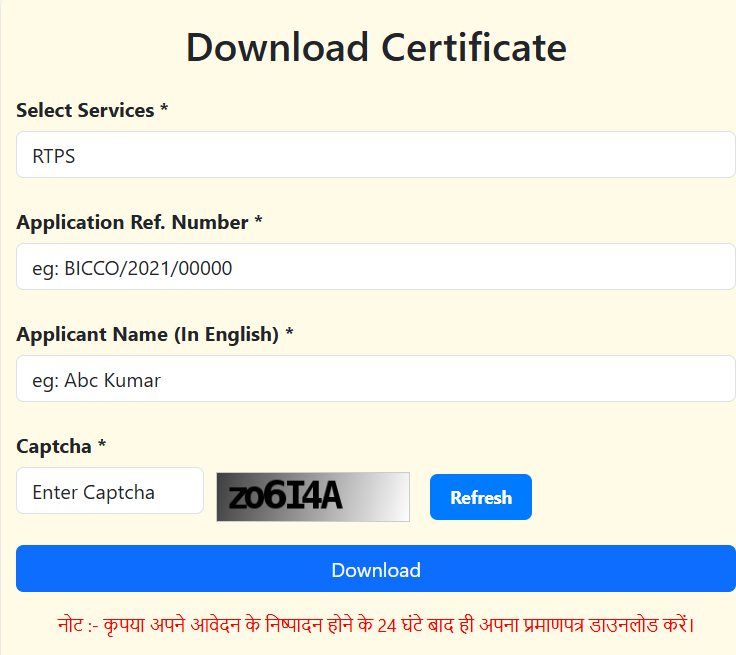
Download Your Caste Certificate (RTPS Bihar).
- First of all, open any browser on your mobile or computer and search for RTPS Bihar. Then click on the official website.
- Now, when the homepage opens, look at the left-hand side. You will see an option like “Citizen Section” > “Download Certificate”.
- Click on that option. Now enter your Application Reference Number, Applicant name in english then enter captcha and click to Download.
- If your certificate is approved, it will be downloaded directly to your device.
NOTE: Make sure your application status is approved, otherwise the certificate will not be available for download.
How do I download my land records from the Bihar Bhumi portal?
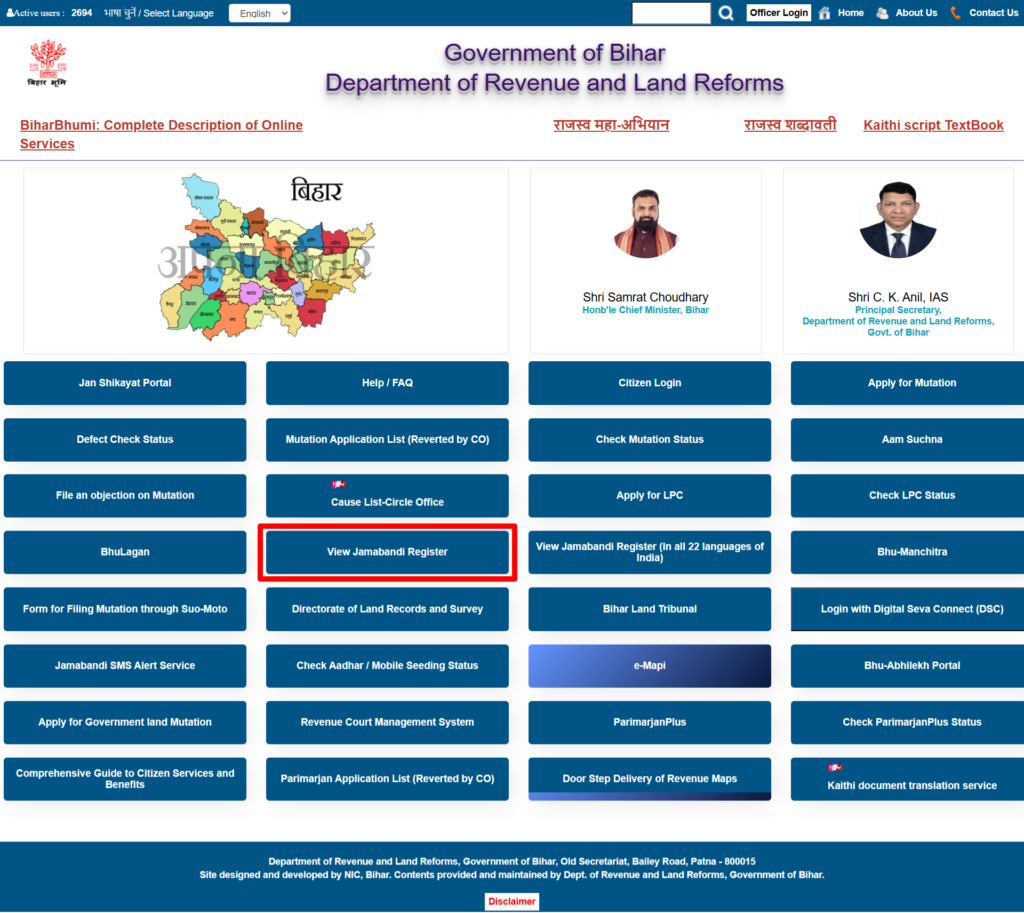
To download your land records (Jamabandi Panji) from the Bihar Bhumi portal, follow these steps:
- Open Google on your mobile or laptop and search for the Bihar Bhumi website, open the site, and close the initial pop-up.
- Click on the “Jamabandi Panji Dekhe” (View Jamabandi Register) option.
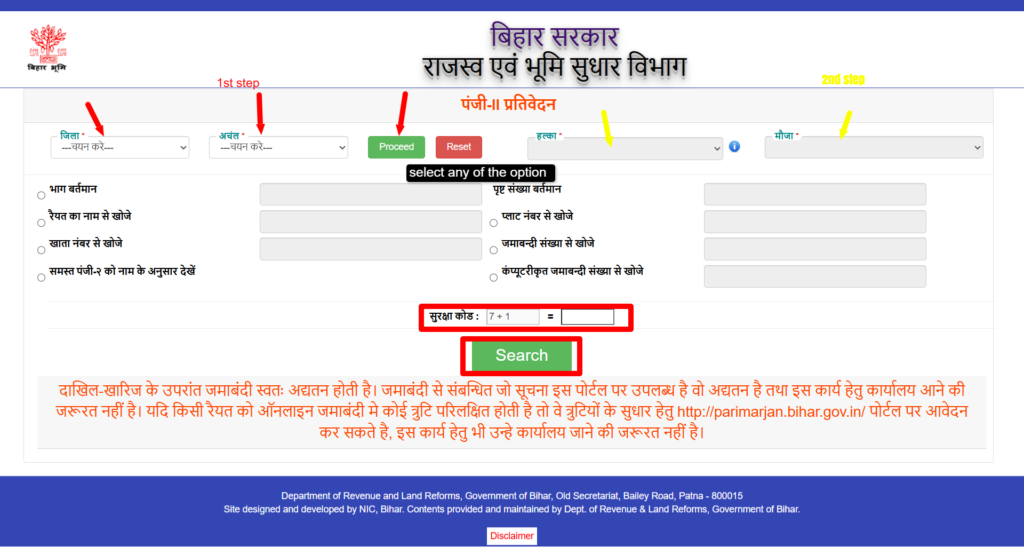
- Select the “district” and “block” where your land is located, then click “Proceed”.
- Select the correct “Halka” and “Mauja” names.
- You can search for your land records using specific details like the Current Part (Bhag Vartaman), Page Number, Account Number (Khata Sankhya), Plot Number, or Jamabandi Number.
- If you do not have those exact details, you can choose the option to search by the Raiyat’s (owner’s) name and enter the name of the person the land belongs to, such as your father or grandfather.
- Solve the “captcha code” on the screen and click “Search.”
- A list of matching records will appear. If there are multiple individuals with the same name, click the “eye icon” next to the record to carefully verify the detailed information, such as the father’s name and account details, to ensure it is the correct property.
- Once you have verified the correct record, click “Print” to download your document.
Direct Important Links:
| Official Website | Click Here |
| Apply Online (Registration) | Apply Now |
| Track Application Status | Check Status |
| Download Certificate | Download Now |
| “Jamabandi Panji Dekhe” (View Jamabandi Register) | Click Here |