What is an Income Certificate (आय प्रमाण पत्र)?
An Income Certificate is an official document issued by the Revenue Department of Bihar that certifies the total annual income of an individual or a family from all sources. This document is absolutely mandatory for students and citizens looking to apply for government scholarships, EWS (Economically Weaker Section) or NCL (Non-Creamy Layer) certificates, fee waivers in educational fields, and various state welfare schemes.
Documents Required for RTPS Bihar Income Certificate (2026 Update)
Important Update for 2026: The Bihar Government has updated the RTPS portal to prevent fraudulent applications. You can no longer apply for an Income Certificate using only an Aadhaar card. You must now provide at least one of the required documents to verify your income:
- Salary / Pension Records
- Income Tax Return (ITR)
- Any Other Relevant Documents
1. Identity Proof (Upload Any One)
- Aadhaar Card
- Voter ID Card
- PAN Card
- Passport, Etc
2. Mandatory Income Proof (New Rule 2026)
- Salary Slip/Pension Slip
- Income Tax Return (ITR) statement
- Any Other Relevant Documents
- “Jamabandi Panji Dekhe” (View Jamabandi Register)- Land record
- A sworn Affidavit / Self-Declaration form stating your family’s exact income.
- Note: If you have an older, expired Income Certificate, uploading it can sometimes serve as supporting proof for a renewal of it.
Apply Online: Income Certificate
How to apply for Income Certificate vai RTPS Portal online? (step by step guide 2026)
Here is the step-by-step process to apply for an income certificate online, according to new guideline:
Step 1: Access the Portal
Open Google on your mobile or laptop, search for “RTPS,” and go to the official website (serviceonline.gov.in).
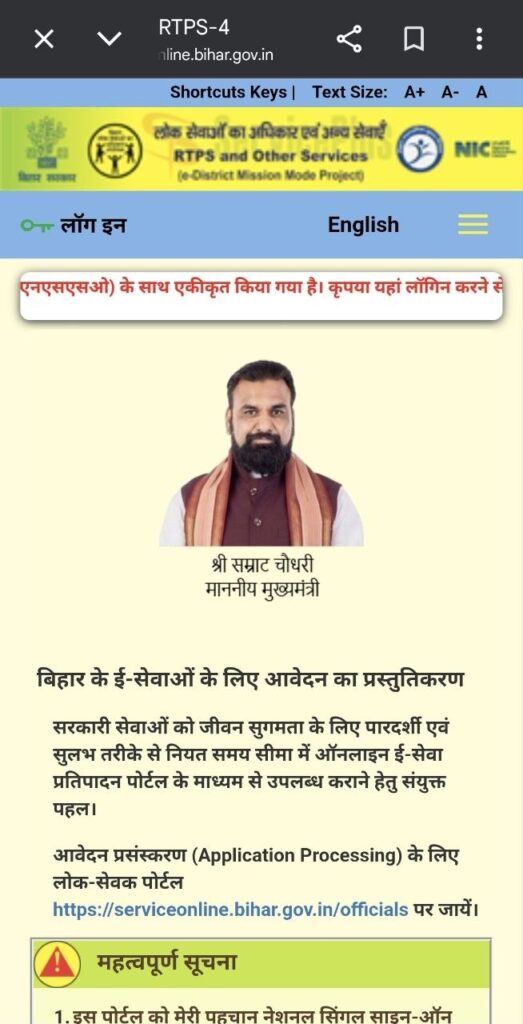
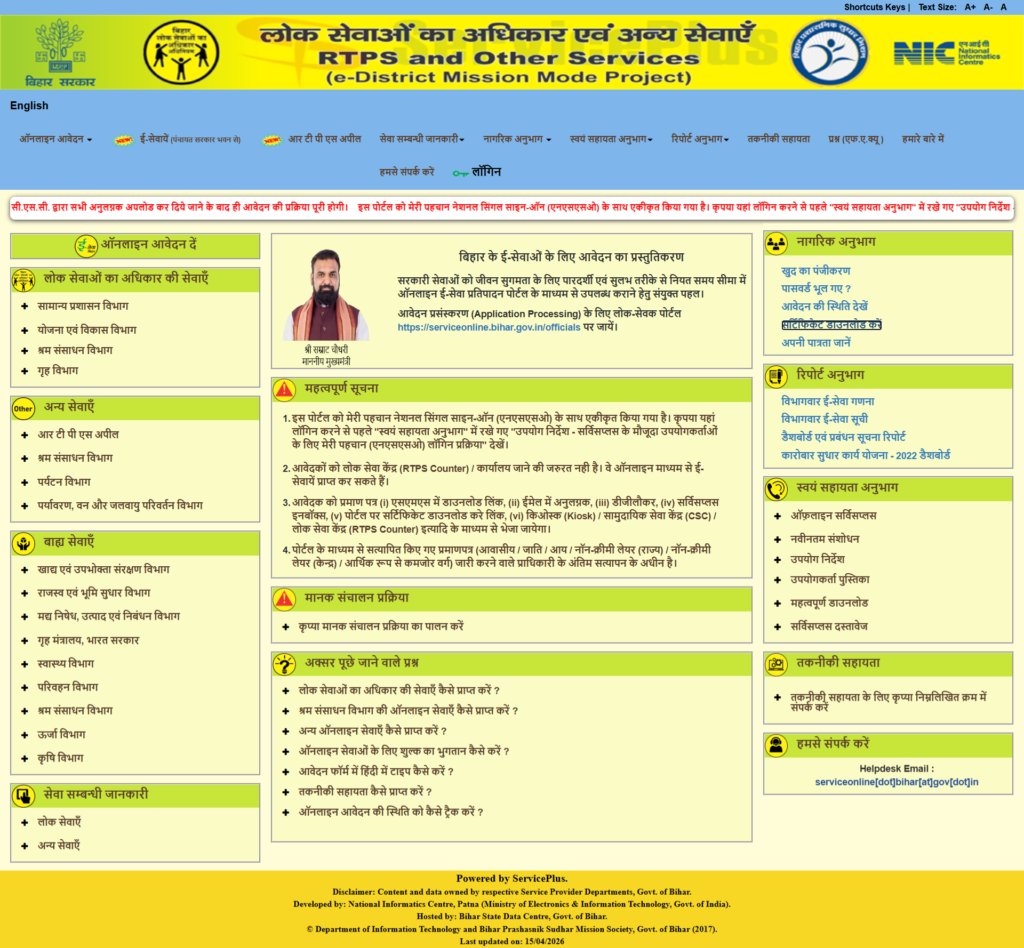
Mobile & Desktop view of RTPS Serviceplus portal.
Step 2: Select the Application Option
On the website, under Apply Online, click on the General Administration Department (सामान्य प्रशासन विभाग) option. Then, select Issuance of Income Certificate (आय प्रमाण पत्र का निर्गमन) and choose to apply at the Block level (अंचल स्तर).
Step 3: Fill in Personal Details
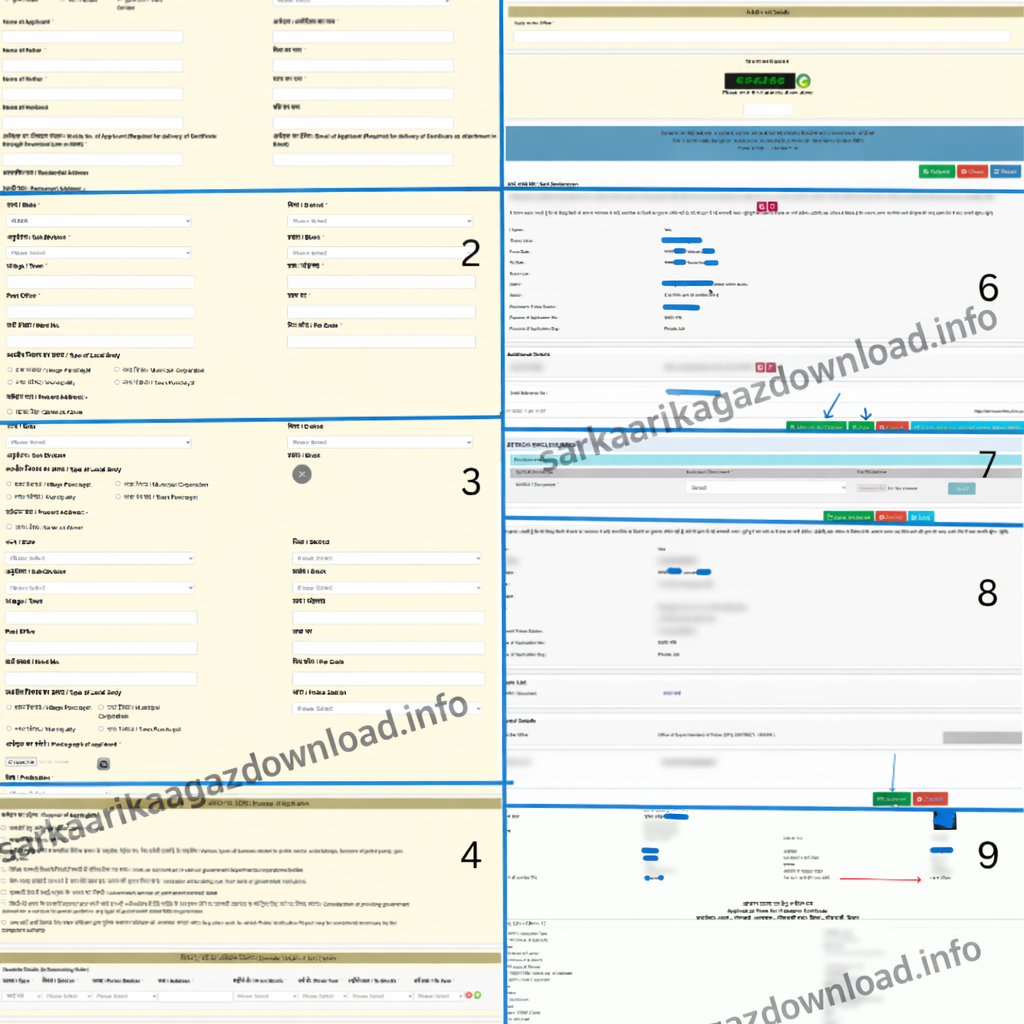
An application form will open. Select your gender and enter your name, father’s name, and mother’s name (and husband’s name, if applicable); these details will appear in both English and Hindi. Enter your mobile number and email ID, then validate them using the OTP sent to your phone.
Step 4: Enter Address Details
Provide your complete address details, including your state, district, sub-division, block, local body type (e.g., Gram Panchayat, Nagar Nigam), ward number, village, post office, police station, and pin code.
Step 5: Upload Photograph
Upload a passport-size photograph.
Note: It is recommended not to enter your Aadhaar number in the text field at this stage to avoid immediate OTP verification issues; you can upload the Aadhaar card as a document later.
Step 6: Provide Profession and Income Information
Select your profession (e.g., student, government servant, business, farmer, labourer) and mention the purpose of your application (e.g., applying for a scholarship).
Next, declare your family’s annual income by categorizing it into sources like government service, agriculture, business, and other sources (put “0” for categories that do not apply to you).
Step 7: Choose Document Type and Proceed
Select the type of income proof you will be providing. If your parents have salaried income/pension or file Income Tax Returns, select those respective options. If not, select the “Other Records” (अन्यायन अभिलेख) option. Enter the captcha code and click Proceed.
Step 8: Review and Attach Annexures (Documents)
Review your application preview. If everything is correct, click the Attach Annexure button to upload your documents. Documents must be under 2 MB and in JPG, JPEG, PNG, or PDF format.
- Identity Proof: Select and upload an ID, such as your Aadhaar Card.
- Income Proof: Under “Other Records,” you must provide a document proving your income. You can upload a land record/Jamabandi Panji, which you can download from the Bihar Bhumi website. If you do not have land in your name, you can upload a completed and signed Self-Declaration Form (स्वघोषणा पत्र) detailing your income sources.
Step 9: Final Submission
Click “Save Annexure” and submit the form. You will receive an acknowledgment receipt showing your application date and the expected delivery date for your certificate. Click on “Export to PDF” to save in your device.
Processing Time
It usually takes 10 working days to process your application.
Validity Period
It is usually valid for one financial year, but sometimes you may be asked to submit a recently issued income certificate.
How to Check Income Certificate Status?
To check your application status of Bihar Income Certificate, follow these steps on the RTPS portal:
- Visit the official website where you applied and click on the option to check application status (आवेदन की स्थिति देखें).
Under Citizen section > Track Application Status. - Enter your Application Reference Number.
- Enter the submission date (the date you applied) and fill in the captcha code, then click submit.
- The system will ask if you want to view and download your certificate; click on this option.
- Provide the applicant’s name, father’s name, and mother’s name, and click submit again.
- Your application status will appear on the screen. If your certificate is ready, the status will show as “Approved” and “Issued and Delivered”.
(Note: If your application was rejected, the reason will be clearly mentioned in the “Remarks” section so you can correct it and reapply).
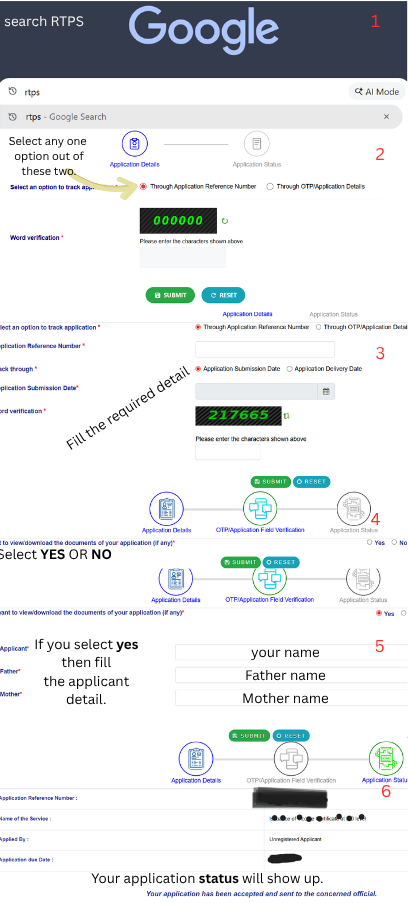
Note: This page is only for demonstration. When you click ‘Submit,’ you will be redirected to the official government website to continue.
Track Application Status
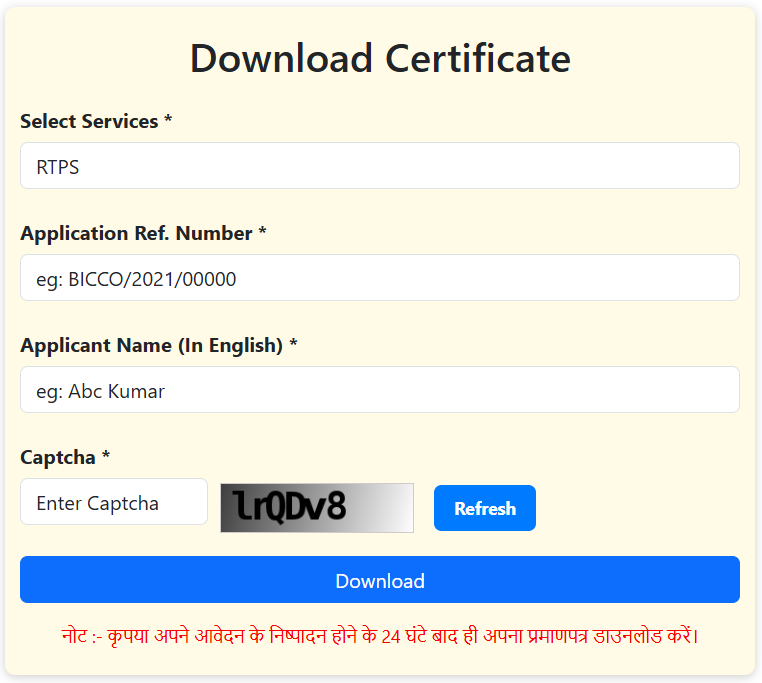
Download Your Income Certificate (RTPS Bihar).
- First of all, open any browser on your mobile or computer and search for RTPS Bihar. Then click on the official website.
- Now, when the homepage opens, look at the left-hand side. You will see an option like “Citizen Section” > “Download Certificate”.
- Click on that option. Now enter your Application Reference Number, Applicant name in english then enter captcha and click to Download.
- If your certificate is approved, it will be downloaded directly to your device.
NOTE: Make sure your application status is approved, otherwise the certificate will not be available for download.
How do I download my land records from the Bihar Bhumi portal?
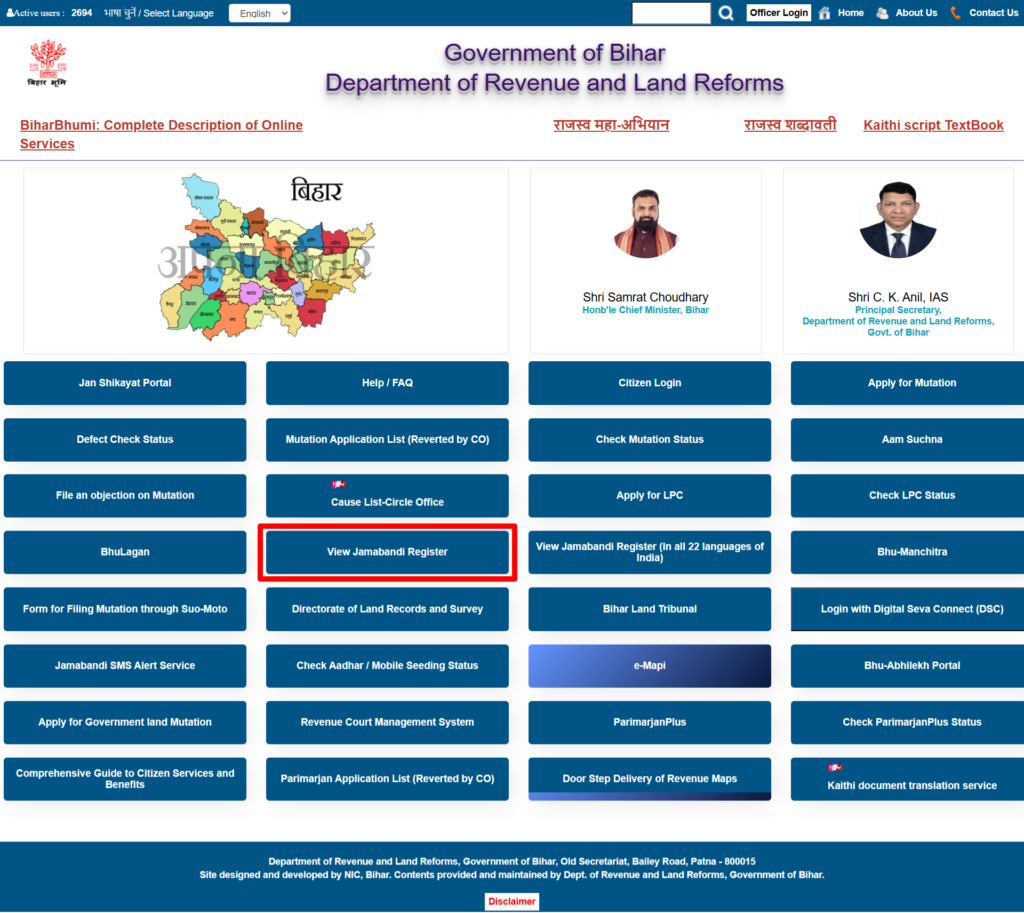
To download your land records (Jamabandi Panji) from the Bihar Bhumi portal, follow these steps:
- Open Google on your mobile or laptop and search for the Bihar Bhumi website, open the site, and close the initial pop-up.
- Click on the “Jamabandi Panji Dekhe” (View Jamabandi Register) option.
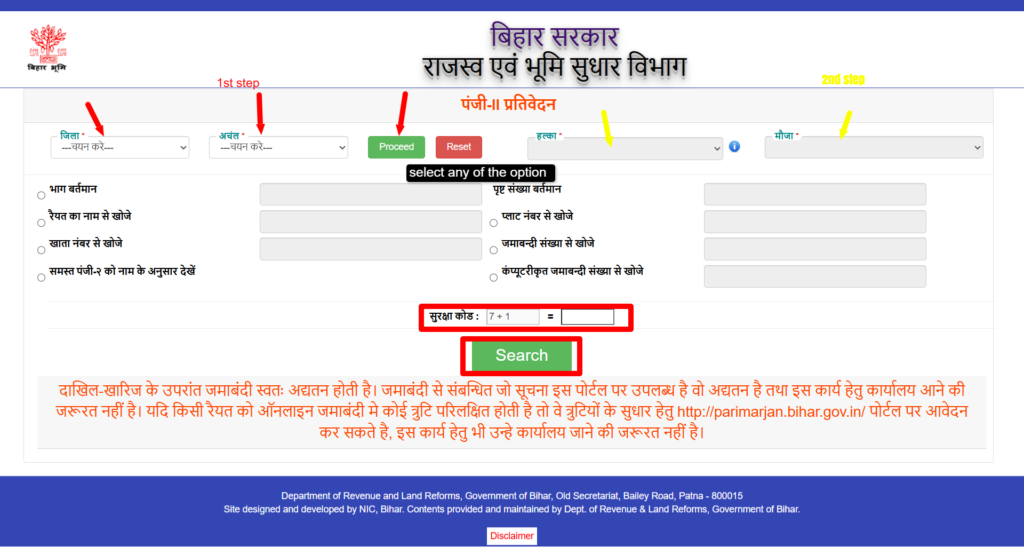
- Select the “district” and “block” where your land is located, then click “Proceed”.
- Select the correct “Halka” and “Mauja” names.
- You can search for your land records using specific details like the Current Part (Bhag Vartaman), Page Number, Account Number (Khata Sankhya), Plot Number, or Jamabandi Number.
- If you do not have those exact details, you can choose the option to search by the Raiyat’s (owner’s) name and enter the name of the person the land belongs to, such as your father or grandfather.
- Solve the “captcha code” on the screen and click “Search.”
- A list of matching records will appear. If there are multiple individuals with the same name, click the “eye icon” next to the record to carefully verify the detailed information, such as the father’s name and account details, to ensure it is the correct property.
- Once you have verified the correct record, click “Print” to download your document.
Direct Important Links:
| Official Website | Click Here |
| Apply Online (Registration) | Apply Now |
| Track Application Status | Check Status |
| Download Certificate | Download Now |
| “Jamabandi Panji Dekhe” (View Jamabandi Register) | Click Here |