
RTPS Bihar Online Services Portal (2026)
ServicePlus | Service Plus Online Bihar | R.T.P.S | R.T.P.S-1 | R.T.P.S-2 | R.T.P.S-3
Bihar Right To Public Service (RTPS) Act and other Services are configured on ServicePlus software framework of NIC for online operation. The homepage of online services of Bihar is available at URL: http://serviceonline.bihar.gov.in
ServicePlus is a meta data based integrated, configurable, e-Service delivery and grievance redressal software framework of NIC.
Welcome to our Serviceplus RTPS Bihar (Right to Public Services) portal Guide. If you want to apply for a Caste Certificate(CC), Income Certificate(IC), or Residence (Domicile) Certificate, our updated 2026 guides will help you understand the new document requirements, apply online without any errors, and track your application status easily at our sarkaarilaagazdownload or you can directly go through the official website: serviceonline.bihar.gov.in.
Here i will share my personal experience, mistake and difficulty happen while applying for this certificate, so that you don’t make the same mistake as i did. Let start the tutorial/guide. How you can apply your any certificate online from RTPS service plus/service online Bihar portal. Which we also know as RTPS-1, RTPS-2, RTPS-3, RTPS, Serviceplus, Serviceonline, Serviceplus online Bihar Portal.
Where as:
RTPS 1: Block Level (Circle Officer) | अंचल स्तर पर
RTPS 2: Sub-Divisional Level (SDO Level) | अनुमंडल स्तर पर
RTPS 3: District Level (DM Level) | जिला स्तर पर
RTPS 4: Specific for Non-Creamy Layer applicants (NCL)
Here are the some of the direct link to the official website that you don’t need to find or surf the official website because official RTPS Bihar portal is very complex to understand where to go, what to do next, so i made the steps easy for you to apply your interested certificate fast and smoothly. Choose which certificate you want to apply:-
DIRECT LINK TO RTPS (service online bihar )
Caste Certificate
Step-by-step guide to apply application online, check status, and download
Read Guide & ApplyIncome Certificate
Step-by-step guide to apply application online, check status, and download
Read Guide & ApplyResidence Certificate
Step-by-step guide to apply application online, check status, and download
Read Guide & ApplyIMPORTANT NOTE: Applicants are advised to don’t apply again and again for a new Certificate if previously issued Certificate is still valid. Instead, they should use the same Certificate again and again for different purposes.
HOW TO ACCESS RTPS serviceplus ONLINE ?
Applicants can access online any-time (24 x 7) through any-means (Desktop, Laptop, Tablet, Smartphone etc having Internet connection) from any-where (Home, Office, Internet Dhaba, Kiosk, Common Service Centre (CSC), Citizen Facilitation Centre (CFC) etc).
First we will access RTPS from mobile phone
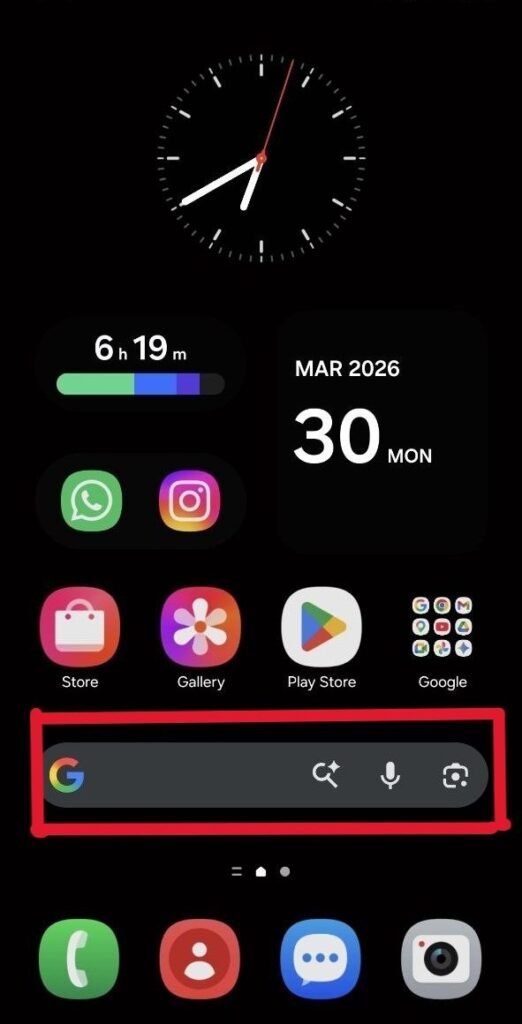
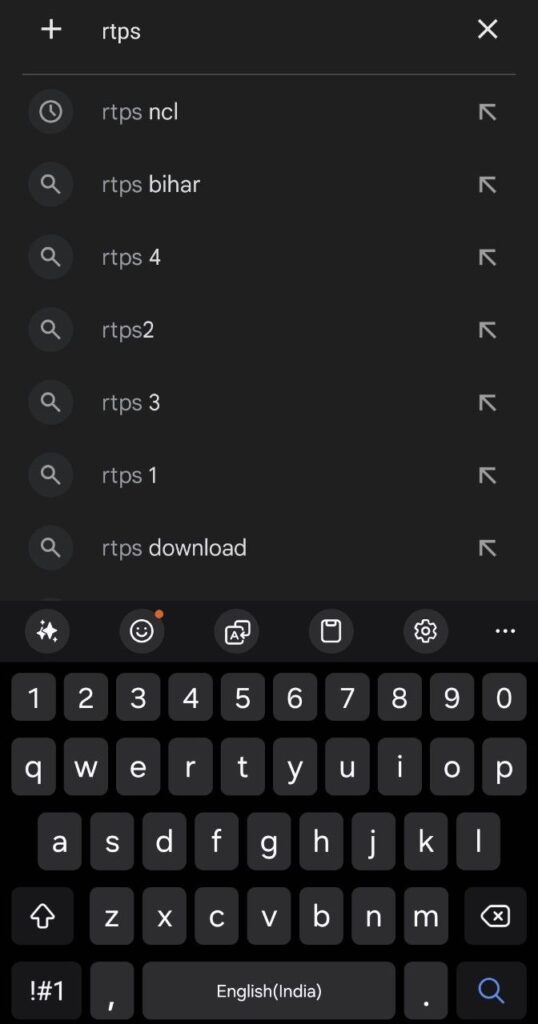
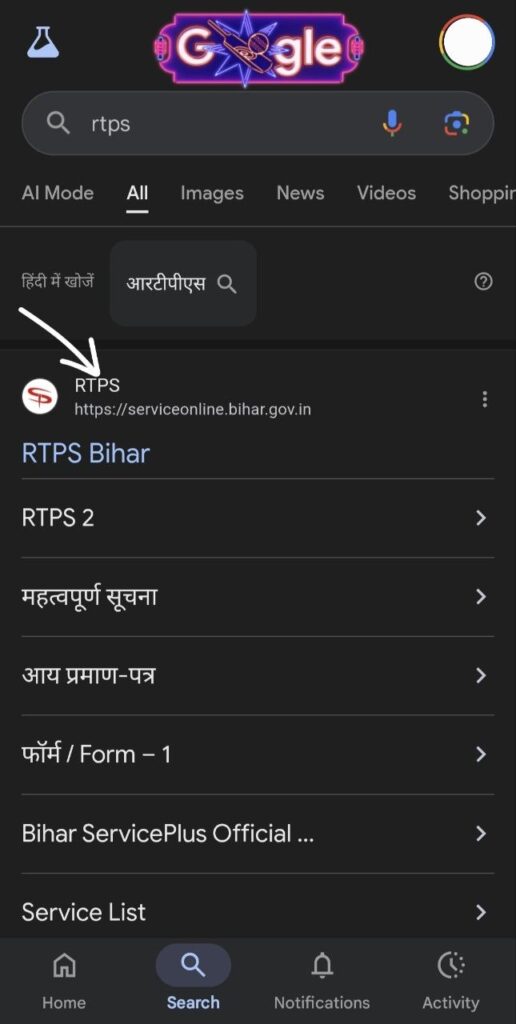
- Go to the home page on your mobile phone and look for the Google search box. Search for “RTPS” on Google and hit enter. At the top of the page, you will see the RTPS website (serviceonline.bihar.gov.in). Make sure you open the official URL ending in “.gov.in”. Don’t go to other sites, as they might SCAM you.
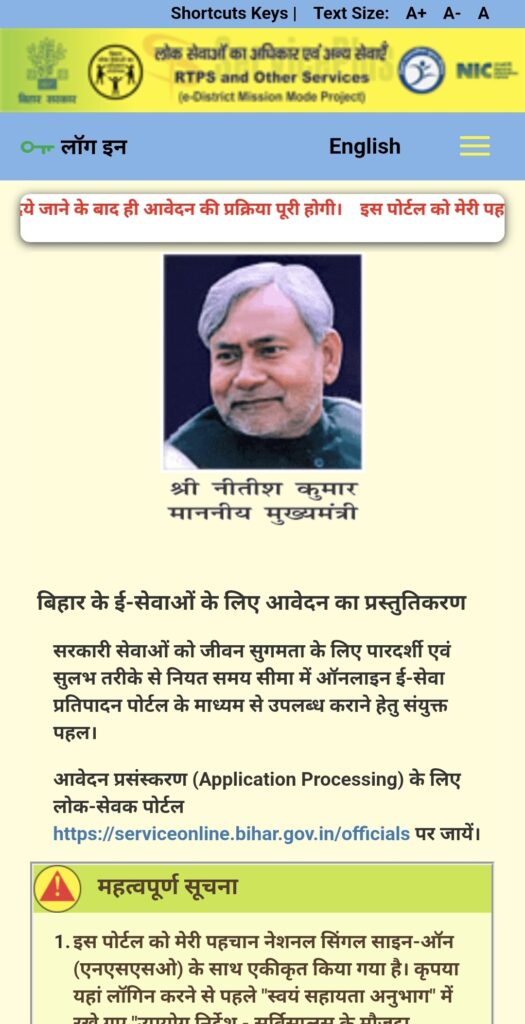
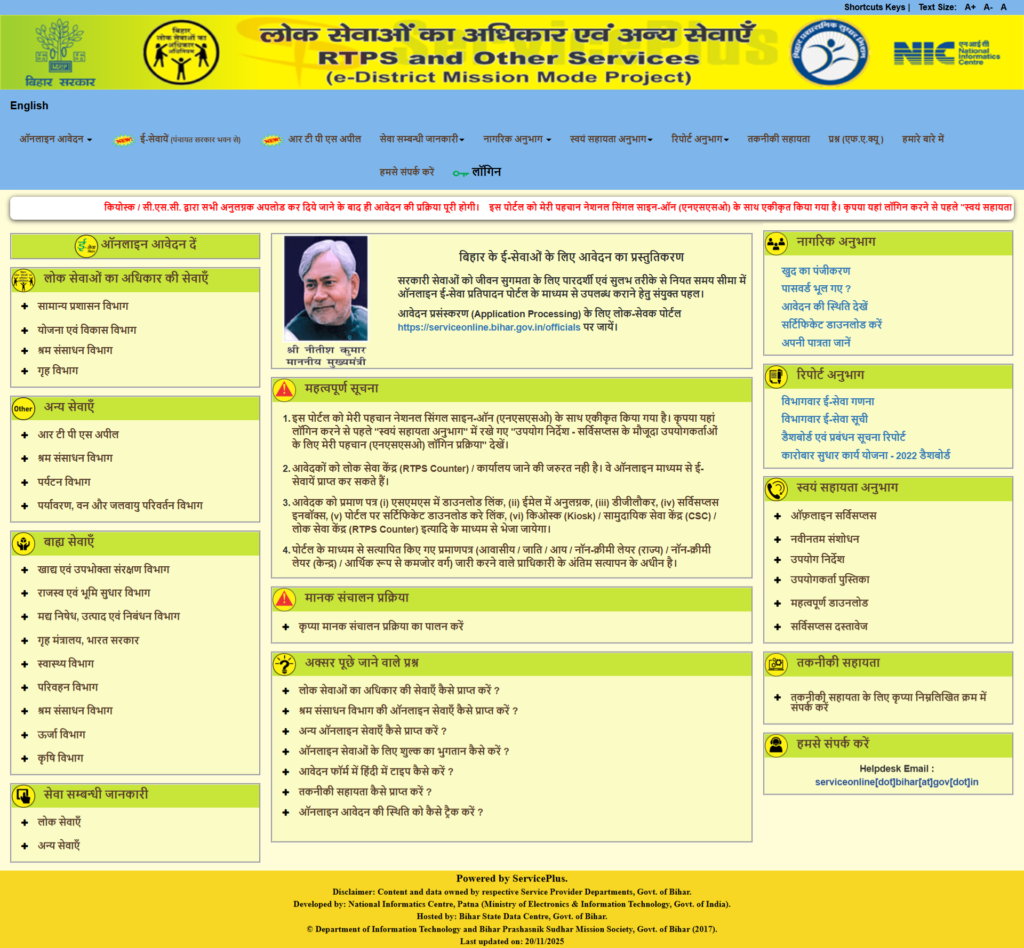
- After opening, the official site interface looks like this.
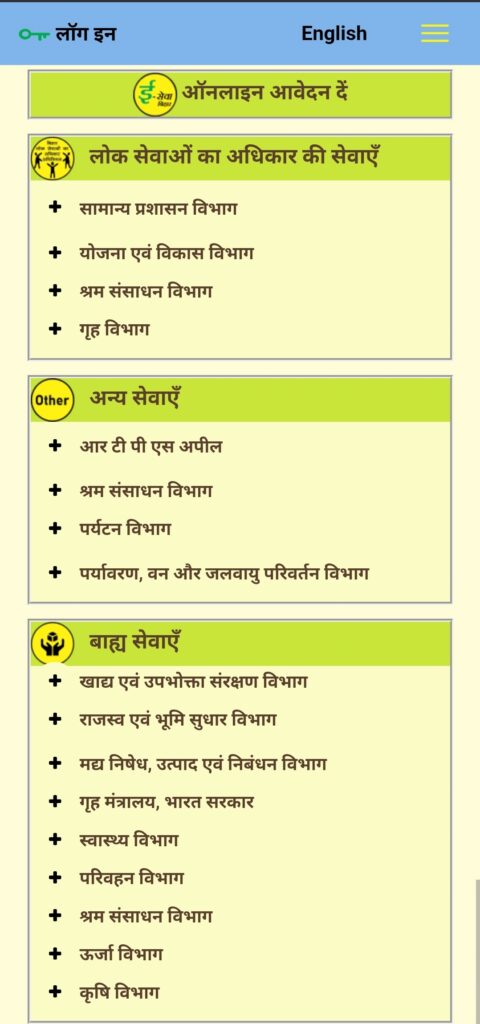
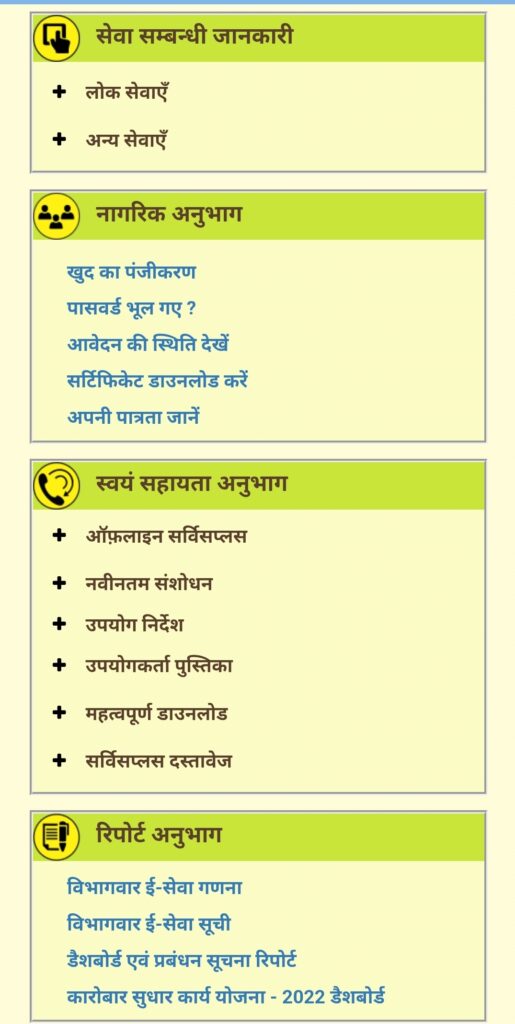
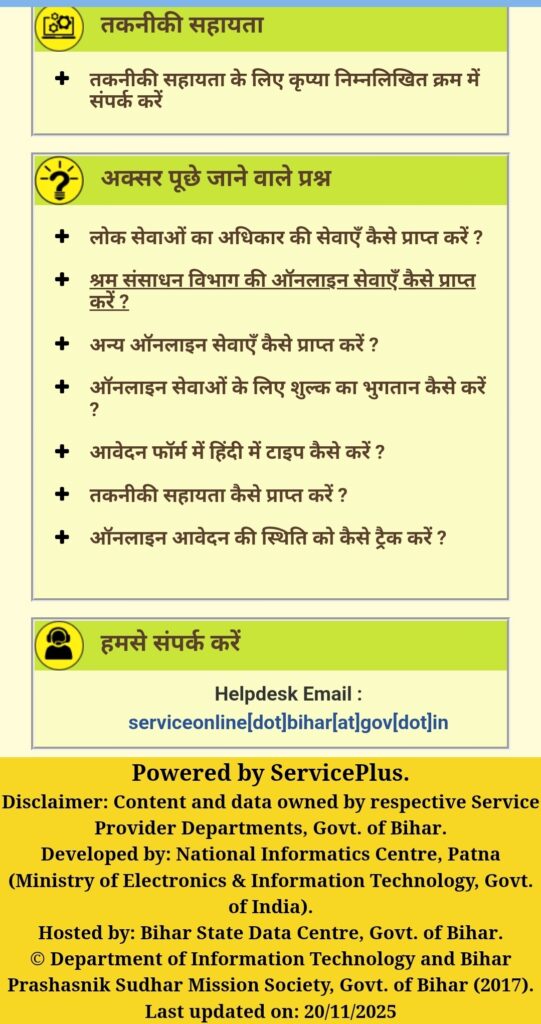
We will now access the RTPS ServicePlus online using our desktop or laptop.
- Now open any browser on your desktop or laptop and search for RTPS. At the top of the page, you will see the RTPS website (serviceonline.bihar.gov.in). Make sure you open the official URL ending in “.gov.in”. Don’t go to other sites, as they might SCAM you.
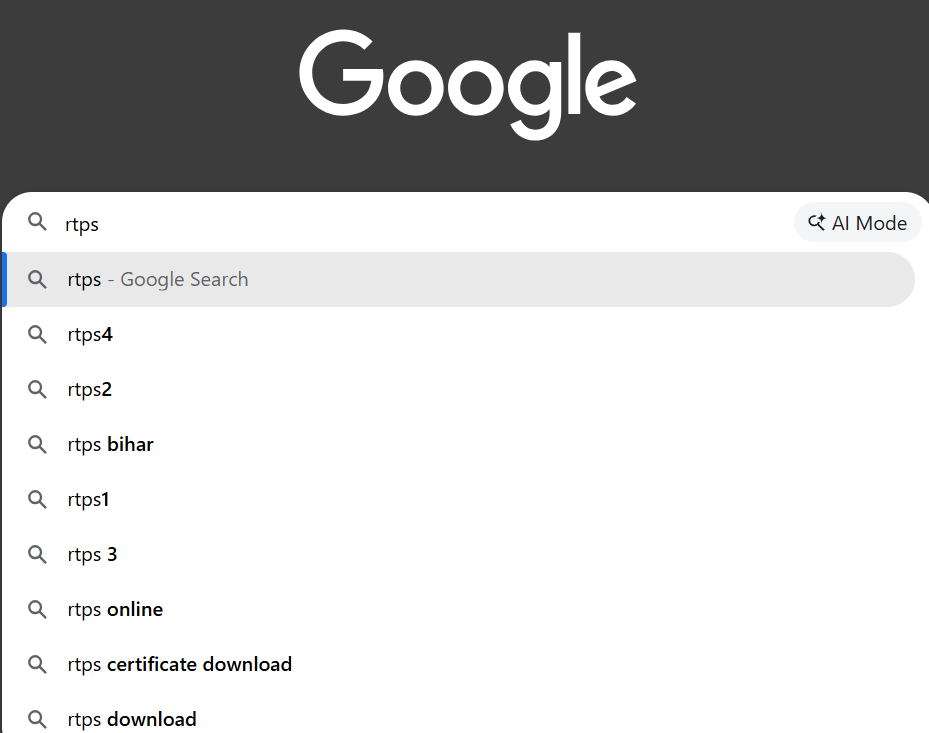
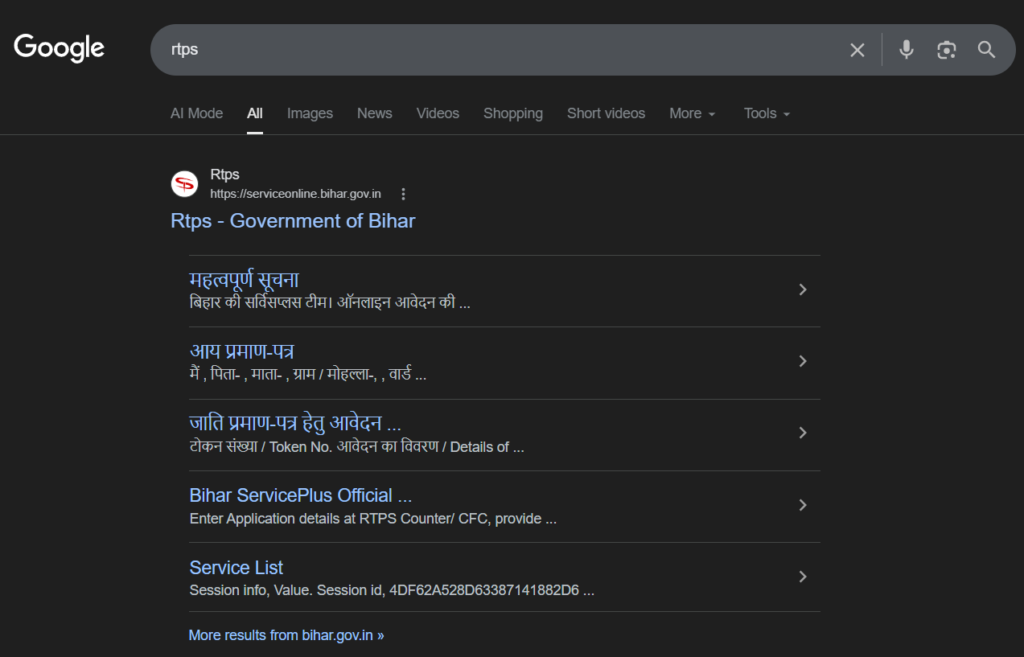
- Click on the top link as indicated in the image above. The interface of the official RTPS website appears like this on a desktop, laptop, or tablet.
How to register a new user on the ServicePlus RTPS portal?
To begin, visit the official homepage of the RTPS ServicePlus website. New users must register by clicking the “Register Yourself” link located in the “Citizen Section” at the top right corner (this is a one-time process). This portal has been integrated with the MeriPehchaan National Single Sign-On (NSSO), which is also referred to as Digilocker.
The interface is as follows:-
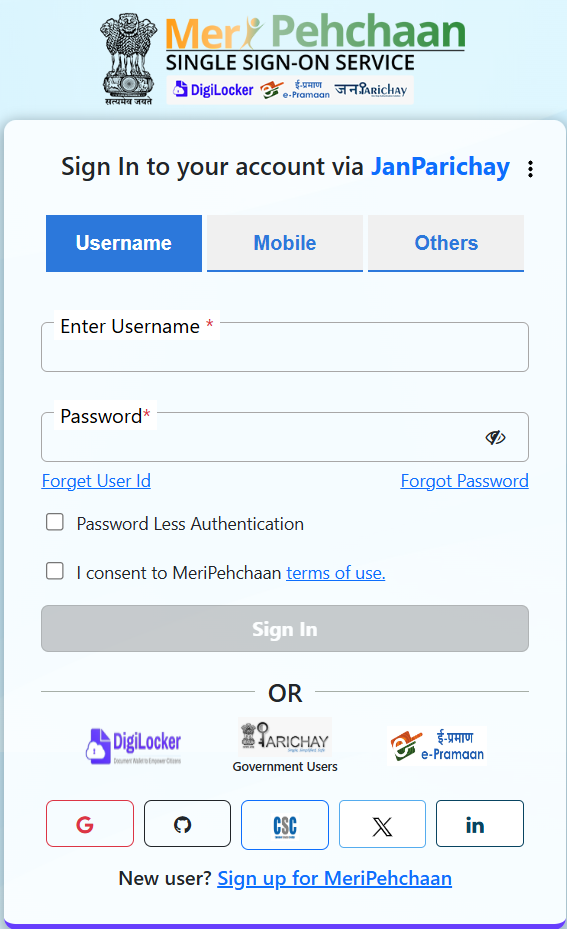
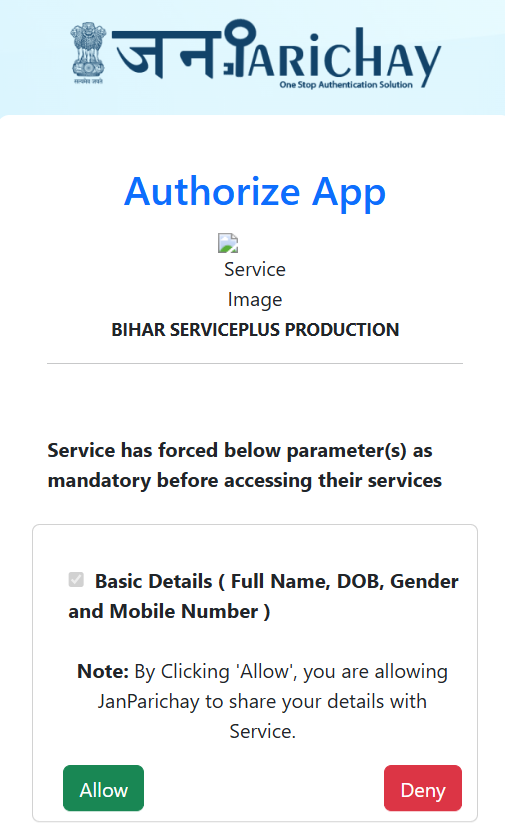
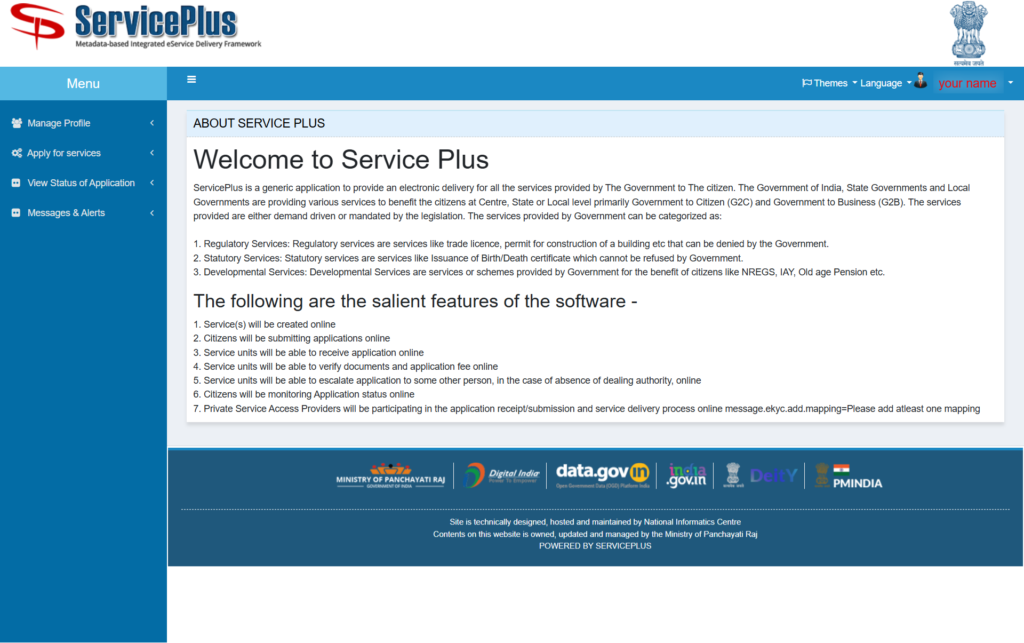
- You can log in using your username and password if you already have an account on Meripehchaan. MeriPehchaan – National Single Sign-On (NSSO) is a user authentication service in which a single set of credentials provides access to multiple online applications or services.
- If you don’t, you can also log in with your mobile number (linked to your Aadhar card) or your email address (linked to your Aadhar card). Make sure to check both the box for “passwordless authentication” and the box for “I consent to MeriPehchaan terms of use“.
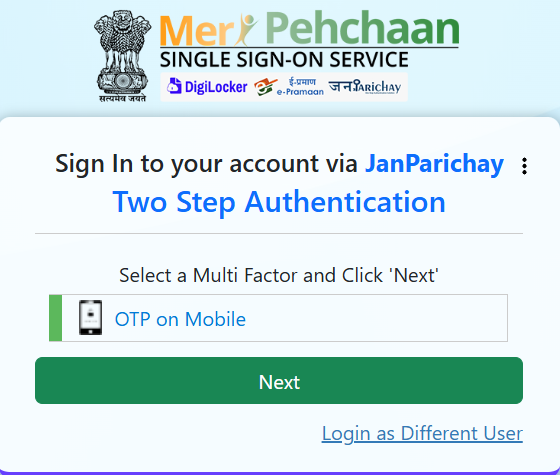
- Then select the “OTP on mobile” option and click next.
- Enter the OTP you get on the registered mobile number. Then click on “allow“; your account will be created in less than a minute.
- Now if you want to apply for any of the applications on the top left corner under the menu option, you will see
“Apply for services” ⇒ “View all available services.” - Search or scroll to find the certificate you wish to apply for. Click on it, and you will be redirected to the application fill-out page.
- The process is the same as for mobile users; follow the same step to register yourself on the RTPS ServicePlus portal.
- If you used Aadhaar authentication, the final approved certificate will be directly sent to your ServicePlus inbox; you don’t need to visit a government office. You will receive SMS and email (which you have given while filling out the form) alerts after your certificate is ready to be downloaded.
Who Can Apply On ServicePlus RTPS Portal.(Eligibility & Criteria)?
Only those who are citizens of Bihar, hold domicile, or operate a business in Bihar are eligible to apply for their required certificates and services through the RTPS ServicePlus portal.
The RTPS ServicePlus Bihar portal is designed to be used by citizens of Bihar and businesses in Bihar seeking various government services and certificates required.
If you want to apply online successfully, you need to follow some criteria:
- Jurisdiction Requirement: You must ensure that you are applying only to the specific office whose request falls within your jurisdiction. This could be a rural local body (Gram Panchayat or Panchayat Samiti), a block, a circle, an urban local body, a subdivision, a district, or a specific department. Applying to an office outside of one’s jurisdiction is not permitted.
- Identity Authentication: Online applicants are recommended to verify their identity using Aadhaar. This process requires the name match the Aadhaar records and an OTP be sent to the registered mobile number.
- Alternative ID Requirement: If you do not complete Aadhaar authentication at the time of form filing, then after processing you must select one of the 12 documents available there, and then you must upload a scanned copy of any of the 12 recognized identity cards approved by the Election Commission of India. These include a voter ID, passport, driver’s license, PAN card, MGNREGA, or any valid government-verified or issued document with a photo.
How to apply online on the RTPS ServicePlus? (Step-by-Step Process)
Follow this step only if you have registered yourself on the RTPS ServicePlus portal:-
1. Required System:
Before applying, I am supposing you are using a Windows computer or laptop equipped with a webcam, scanner, and printer. You must use the Mozilla Firefox browser and have Adobe Flash Player (NPAPI) installed, as these are mandatory for capturing photographs online through your webcam.
If you are using an Android mobile phone, the process will be the same.
Then log in to your account.
2. User Registration (One-Time):
Visit the homepage at http://serviceonline.bihar.gov.in and click on “Register Yourself” under the Citizen Section.
Fill in your details. You will need to validate your account by entering OTPs sent to both your email address and mobile number. If you do not register yourself, then do this step; otherwise, skip the step.
The process for registration and login has been made even simpler because the RTPS service portal is now integrated with Meri Pehchaan, bringing more convenience to the users.
3. Selecting the Service and Filling the Form:
Log in to the RTPS ServicePlus portal and locate your required service at the top left corner under the menu on the homepage. “Apply for services” ⇒ “View all available services.”
Fill out the online application form carefully and correctly. You have to be very quick while filling out your form; if you take a long time and you click “proceed,” it will show “time out.”
You can also save your application as a “draft” to edit it later or proceed to attach documents you selected. (Tip: Use the Aadhar card.)
4. Uploading Attachments:
It is recommended to upload these documents as small-sized PDF files or images. Documents can be uploaded from your computer, scanned directly, or fetched from your ServicePlus Document Repository.
5. Fee Payment (If Applicable):
Generally RTPS services are free of cost; applicable fees may apply to some select ‘Other Services.’
If a fee is required, you will be automatically redirected to the payment gateway. You must select the “e-payment” mode (net banking, debit card, or credit card) and avoid selecting the cash/check option. Now UPI payment is also acceptable.
After payment the system will automatically redirect you back to ServicePlus.
6. Submission and Acknowledgment:
After reviewing your application and attached document, click Submit.
Upon submission, an online acknowledgment and a copy of the application details will be generated. You should download it for your records.
If you used Aadhaar authentication, the final approved certificate will be delivered directly to your ServicePlus inbox, meaning you will not need to visit a government office. You will receive SMS and email alerts once your certificate is ready to be downloaded.
RTPS Bihar (ServicePlus) – User Queries & Solutions
1. How to Get Your RTPS Bihar Certificate Urgently (Fast-Track Method)
Pro Tip: While the RTPS Bihar portal doesn’t have an official online “Tatkal” (urgent) button for basic certificates, many applicants successfully use this manual workaround during emergencies—like sudden job verifications or college admissions. Keep in mind that this is a practical, in-person solution rather than an official online feature.
Follow these steps to get your Caste Certificate, Income certificate, Residence Certificate and NCL urgently:
- Apply Online First: Start by submitting your application on the official RTPS portal.
- Print Your Acknowledgement Slip: Once your online application is successfully submitted, print a copy of your final Acknowledgement Receipt.
- Write a Formal Request Letter: To save time, write a handwritten letter to your local Block or Circle Officer (CO) before you leave home. Clearly state your Application Reference Number and explain exactly why you need the document so quickly. Be sure to attach proof of your emergency, such as a copy of your exam admit card or a job interview letter.
- Visit Your Local Block Office: Take your documents to the RTPS Counter at your designated Block Office during standard working hours on a weekday.
- Submit Your Request in Person: Politely explain your situation to the RTPS operator or the officer in charge. Hand them your printed online receipt, your handwritten letter, and your proof of urgency.
- Download Your Certificate: If all your uploaded documents are accurate, the officer can fast-track the verification and approve your application that very same day. Once approved, you will get an SMS and email notification. You can then download your final certificate immediately using the download tool on our website.
If this don’t help then out side of office you will find many broker. Hoop you understand.
How to Apply Through RTPS Tatkal Counter
Generally, normal applications are submitted on the RTPS (Right to Public Services) Bihar portal, which takes 10 to 14 days. However, if someone needs a Tatkal (Urgent) certificate (Caste, Income, Residence, etc.), going to the Block office is the best and surest way.
The Complete Process of Getting a Tatkal Certificate: (Officially)
- Apply Online: First, apply normally through the RTPS portal from home and print its Acknowledgement Receipt.
- Visit the Block Office: Take that receipt to the RTPS Tatkal counter of your Block/Anchal office.
- Fill the Tatkal Form/Application: As you mentioned, ask the staff at the counter for a Tatkal form. If the form is not available, you might have to write a simple application addressed to the CO (Circle Officer) stating why you need the certificate urgently.
- Attach Urgency Proof (Most Important): To avail the benefits of the Tatkal service, you have to prove why you have an emergency. For this, you will need to attach a Proof. For example:
- College/School admission form or notice.
- Job interview letter or admit card.
- Army/Police recruitment notification.
- Submit the Form: Submit your online receipt, Tatkal application/form, and urgency proof at the counter.
By following this process, your certificate, which was supposed to take 14 days, will be ready and provided to you within 1 to 2 days (or sometimes on the very same day) after the officer’s (CO) approval.
2. How many days does it take to get a certificate from RTPS Bihar?
Normally, it takes 10 – 14 working days for the Block Level (अंचल स्तर) officer to approve your Caste, Income, or Residence certificate. Some certificate may takes 14-21 working days.
NOTE :- Submit the genuine documents required for that certificate.
Under the RTPS Act, specific timeframes are mandated for processing your certificate:
- Caste Certificate, Income Certificate, Residence Certificate: 10 working days
- Birth Certificate and Death Certificate: 2-21 Working days
- EWS Certificate and NCL Certificate: 10-21 Working days
3. Why was my RTPS Bihar application rejected and how can I fix it?
RTPS Bihar applications usually get rejected because of a few common mistake made by applicant: incomplete paperwork, mismatched details (like a name or address etc), or blurry document uploads.
If your application gets rejected, the first thing you should do is check the “Remarks” section in your “Track your status” to find the exact reason.
Common Reasons for Rejection:
- Applying in the wrong jurisdiction
- Uploading blurry or unclear documents
- Mismatched personal details
- Missing or incorrect documents
How to deal with a rejection: Personally, I will say if you get rejected, just check the remarks to see what went wrong and submit a completely fresh application. It’s the easiest and fastest way.
But, if you really want to stick with that specific application and you think it was rejected unfairly without proper review, you can file an appeal. A higher authority will review it, which usually happens within 30-45 working days depening on your application.
Just a heads-up though: only go through this process, if you aren’t in a rush, because the appeal process takes a lot of time.
4. My RTPS application status is showing ‘Under Process’ after 14 days. What should I do?
If your Caste, Income, Residence or any other certificate is pending beyond the standard 10-14 working days limit, it usually means the local Revenue Officer (Karamchari) has not completed the physical or digital verification of your submitted document.
- Solution: Print your online Acknowledgement Slip and visit your local Block Office (RTPS Counter). Speak directly to the RTPS operator or Revenue Officer to get it approved as soon as possible.
5. Can I apply for a Caste, Income, or Domicile certificate urgently (Tatkal)?
The online RTPS portal does not have a direct “Tatkal” button for these basic certificates. However, if you need the document urgently for a job application, admission, or form filling, you can fast-track it. Apply online first, then print the receipt, and take it to your Block Office along with proof of your urgency (like an exam admit card or job interview letter). The Circle Officer (CO) can approve it on the same day itself (if possible).
6. What is the difference between a Caste Certificate and an NCL (Non-Creamy Layer) Certificate?
A Caste Certificate simply proves which specific caste category you belong to (SC, ST, BC, EBC). An NCL (Non-Creamy Layer) Certificate is specifically for the BC and EBC categories to prove that their annual family income is below ₹8 Lakhs.
At first, you must have a valid Caste and Income certificate before you can apply for the NCL certificate on the RTPS portal to claim reservations in government sectors.
7. How can I correct a mistake (wrong name or address) in my submitted RTPS form?
Once you click “Final Submit” on the RTPS portal, there is no online edit or correction window available for it.
- Solution: Do not wait for it to be processed. You should immediately submit a new application on RTPS serviceplus portal with the correct information of yours. The incorrect application will eventually be rejected by the officer, while your new, correct application will be processed normally.
8. Can we apply for a certificate more than once?
Yes, you can apply more than once, but don’t do that. Each certificate is valid for one financial year (or 6 months, depending on your purpose).
NOTE: Applicants are advised to don’t apply again and again for a new Certificate if previously issued Certificate is still valid. Instead, they should use the same Certificate again and again for different purposes.
10. What are the 12 identity cards accepted by RTPS ServicePlus?
If an applicant chooses not to complete Aadhaar-based authentication when submitting an online application, they are required to upload a scanned copy of any one of the 12 types of Identity Cards recognized by the Election Commission of India.
These 12 recognized documents are:
- Voter ID Card (मतदाता पहचानपत्र)
- Passport (पासपोर्ट)
- Driving License (ड्राइविंग लाइसेंस)
- Service ID Card (Centre, State, Public Sector)
- Passbook (with Photo issued by Bank / Post Office)
- PAN Card (पैनकार्ड)
- Smart Card (issued under Plans of Ministry of Labour)
- MGNREGA Job Card (मनेरगा जॉबकार्ड)
- Health Insurance Smart Card (issued under Plans of Ministry of Labour)
- Pension Document (with Photo)
- Govt. ID Card (issued to MP, MLA, MLC)
- Aadhaar Card (आधारकार्ड)
Important: Please only submit your real, genuine documents. Providing false information or fake documents can lead to:
- Application rejection.
- RTPS taking legal action.
- You being completely blacklisted from using government services in the future.
How to Apply on R.T.P.S Bihar SurvisePlush Online?
Direct Link: Official R.T.P.S
Following is the procedure to apply for any certificate on RTPS ServicePlus Online Bihar.
- To apply for certificates through the RTPS Bihar Portal, visit and open the official website of Bihar government serviceonline.bihar.gov.in.
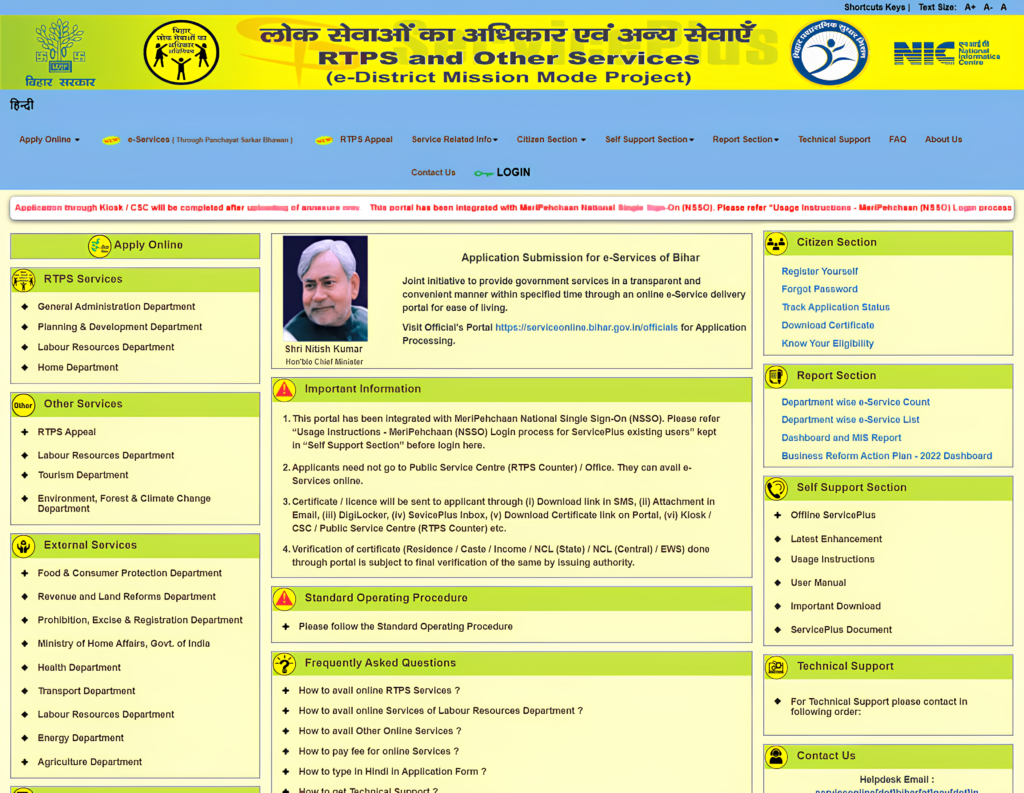
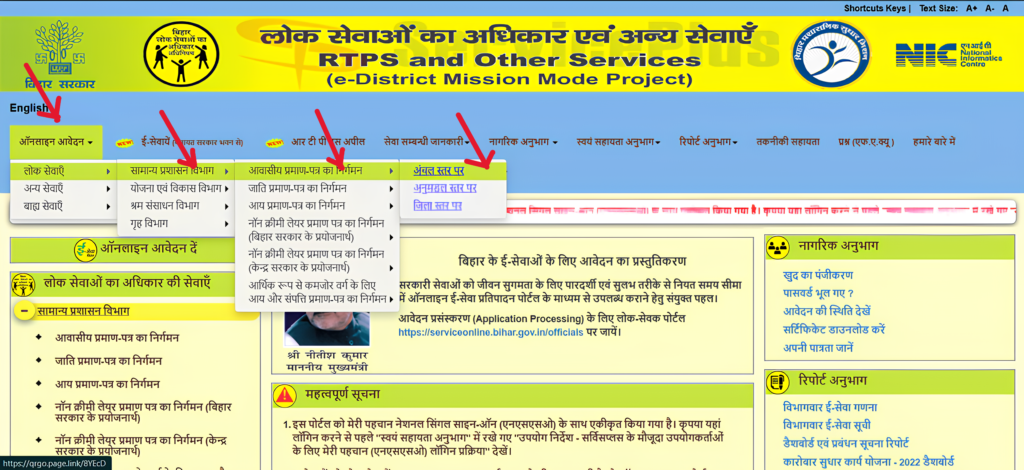
- On the homepage of the RTPS Bihar portal (ServicePlus / ServiceOnline Bihar), go to the “Apply Online” section. Under this, you will find “RTPS Services (Right to Public Services)” => “General Administration Department”. Select the certificate type you want to apply for.
- After that, follow this path on the ServiceOnline Bihar portal:
लोक सेवाओं का अधिकार की सेवाएँ > सामान्य प्रशासन विभाग >आवासीय प्रमाण-पत्र का निर्गमन
RTPS Services → General Administration Department → Issuance of Residence Certificate
Once you click on this option, the online application form for the Residence Certificate will open on your screen. - Here, we are explaining the process for applying for a Residence Certificate (Niwas Praman Patra) at the Block/Circle Level (Anchal Level). You can follow the same steps to apply for other certificates such as caste certificate or income certificate.
Now, click on the “Block Level (Anchal)” option available over there.
After this, the Residence Certificate (Niwas Praman Patra) application form will appear on your screen, which you can fill out easily by entering the required details about yourself or the applicant.
In the form, you need to provide the Details of the Applicant:
- First, select your Gender
- Then enter the Applicant Name, Father’s Name, Mother’s Name, and Husband’s Name (if applicable)
- Fill in your valid Mobile Number and Email ID correctly
Address Details (Permanent Address)
Next, you need to enter your permanent address information:
- State: Bihar
- District
- Sub-Division
- Block
- Type of Local Body
- Ward Number
- Village (for rural) / Mohalla (for urban)
- Post Office(PO)
- Police Station(PS)
- Pin Code
- Upload a self-attested photograph of the applicant
Other Details
In the “Other Details” section:
- Select the Type of Residence (Permanent or Temporary)
- Enter the Purpose of Application (you may leave it blank if not required)
Final Step
- Read the self-declaration carefully and click on the “I Agree” option
- Enter the captcha in the given box
- Finally, click on the “Proceed” button to submit your application
This process is part of the RTPS Bihar Online service available on the ServicePlus (ServiceOnline Bihar) portal, making it easy to apply for a residence certificate online.
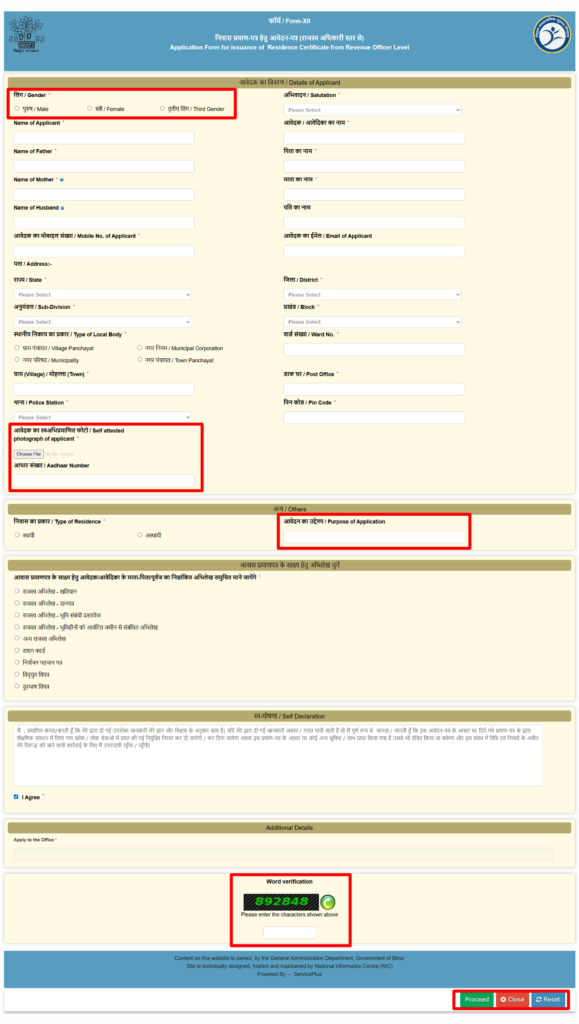
Note: Wherever you see a star (*) on the application form, that section is mandatory.
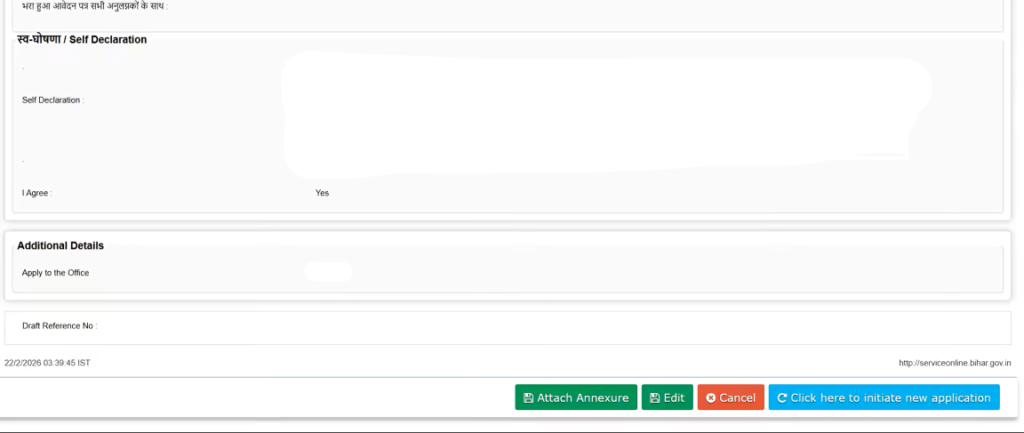
- After clicking on the “Proceed” button, a preview of your filled application form will be displayed on your screen. Carefully review all the details entered. If everything is correct, click on the “Attach Annexure” button. If you find any mistakes, click on the “Edit” button to make the necessary corrections before proceeding further.
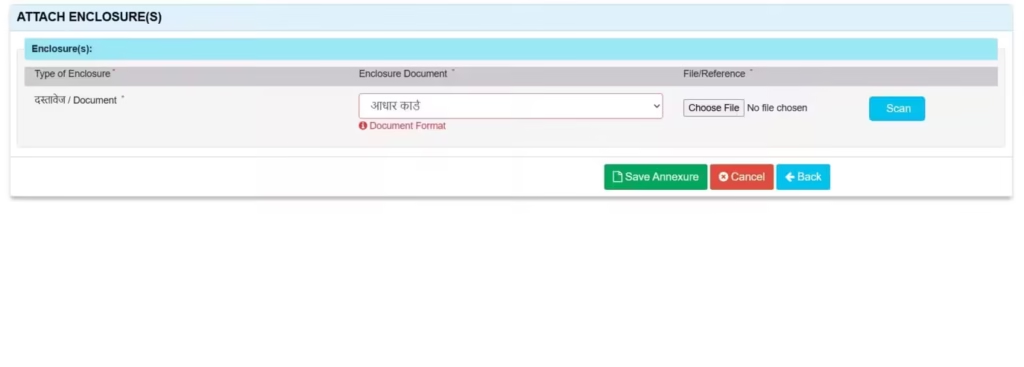
- Now you need to upload your required documents. In the “Enclosure Document” section, select your Aadhaar Card and upload it, after that click on the “Save Annexure” button.
- After submitting the application, you will receive an acknowledgement receipt on your screen. Make sure to download this receipt and keep your Application Reference Number safe for future use, such as tracking status or downloading your certificate.
RTPS Bihar Application Status Check – How to Track Your Application
Official Site: RTPS Bihar Application Status Check
You can easily check your application status on the RTPS Bihar portal (ServicePlus / ServiceOnline Bihar) by following these steps:
Step-by-Step Process
Step 1:
Go to Google and search for “RTPS Bihar”, then look for the official website: serviceonline.bihar.gov.in or sarkaarikaagazdownload.info
Step 2:
On the homepage, find and click on the “Application Status” or “Track Application Status” option.
Step 3:
Enter your Application Reference Number (which you received at the time of application in your acknowledgement slip).
Step 4:
Fill in the captcha code correctly.
Step 5:
Click on the “Submit” or “Track Status” button.
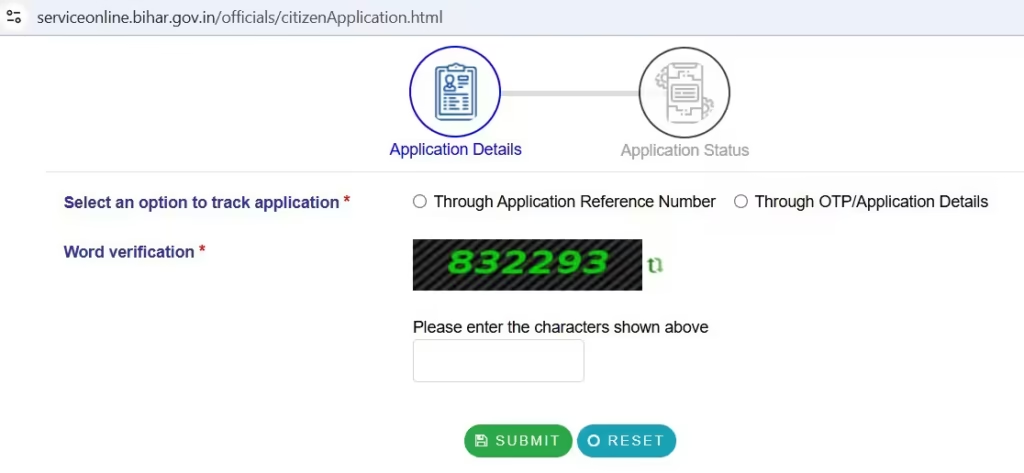
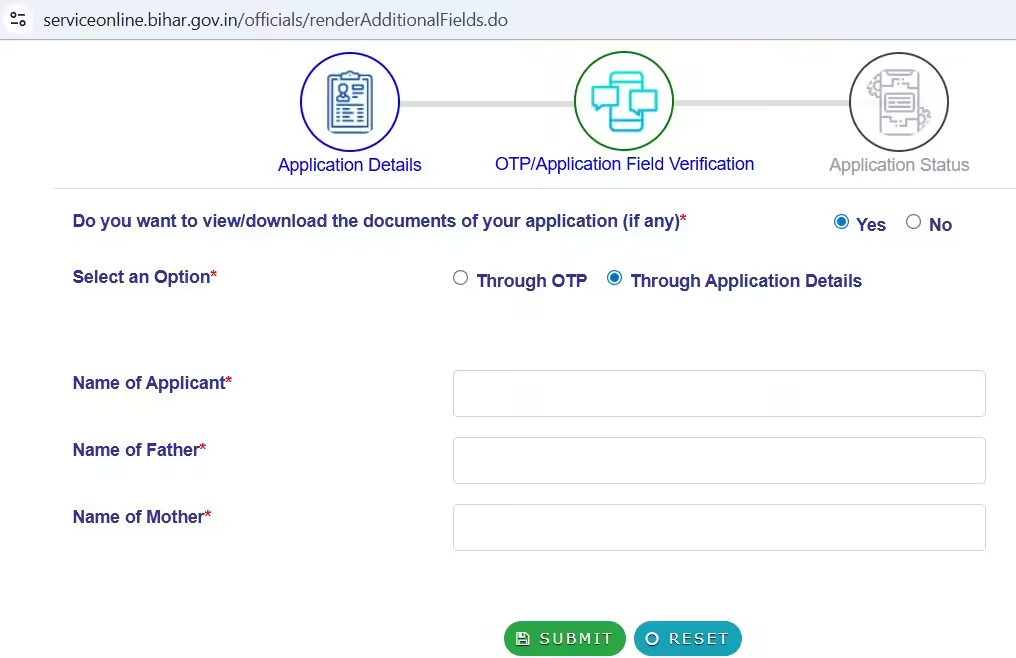
- After that, you need to enter the Applicant Name, Father’s Name, and Mother’s Name, then click on the Submit button. Once you submit the details, your RTPS Bihar application status will be displayed on your screen.
⚠️ Important Note:
Please download your certificate only after 24 hours of application approval. However, in some cases, you may still be able to download your certificate even before 24 hours if it has already been generated on the portal.
RTPS Bihar Certificate Download – How to Download Online
You can easily download your certificate (caste, income, residence, EWS, NCL, etc.) from the RTPS Bihar portal (ServicePlus / ServiceOnline Bihar) by following the given steps below:
Official website: RTPS Bihar Certificate Download
Step-by-Step Process
Step 1:
Go to Google and search for “RTPS Bihar”, then look for the official website: serviceonline.bihar.gov.in
Step 2:
On the homepage, go to the “Citizen Section” and click on the “Download Certificate” option.
Step 3:
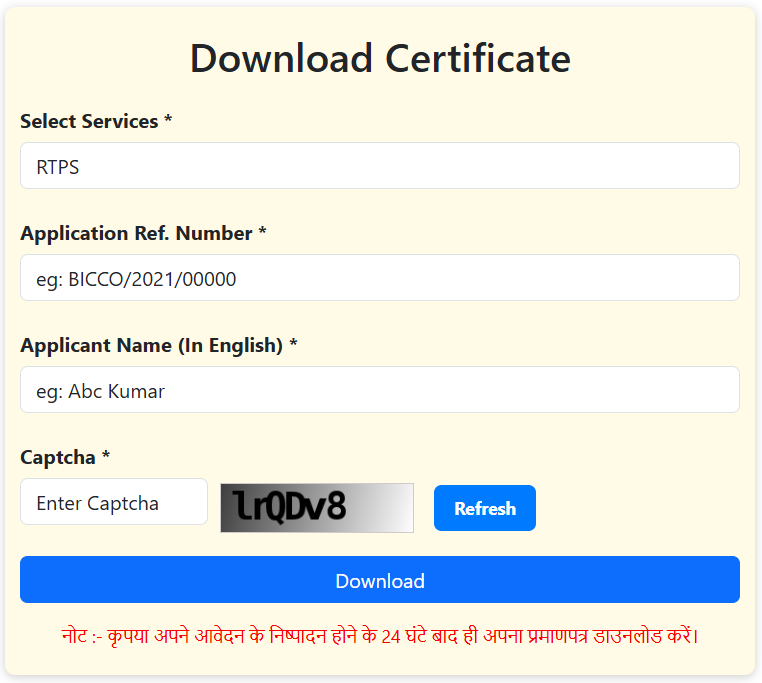
You will be redirected to the RTPS Bihar Certificate Download page. Enter the required details:
- Application Reference Number
- Applicant Name
- Captcha Code
Step 4:
Click on the “Download Certificate” button.
Step 5:
Your certificate will be downloaded instantly in PDF format and saved on your device.
Important Points
- Make sure the application status is Approved before downloading
- Use correct details (Application Number & Name)
- It is recommended to download the certificate after 24 hours of approval
Certificates You Can Download
- Caste Certificate (Jati Praman Patra)
- Income Certificate (Aay Praman Patra)
- Residence Certificate (Niwas Praman Patra)
- EWS Certificate
- NCL (Non-Creamy Layer) Certificate
- Birth & Death Certificate
- Character Certificate
This RTPS Bihar Certificate Download service through the ServicePlus Bihar portal makes it easy for citizens of Bihar to access their important documents online without visiting government offices.
🔔 नोट :- कृपया अपने आवेदन के निष्पादन होने के 24 घंटे बाद ही अपना प्रमाणपत्र डाउनलोड करें।
Benefits of RTPS ServicePlus Bihar
The RTPS Bihar portal (ServicePlus / ServiceOnline Bihar) provides multiple advantages to the citizens by making government services digital, fast, and transparent. Here are the key benefits:
1. Easy Online Access
Citizens can apply for and download certificates such as caste certificate, income certificate, residence certificate, EWS, and NCL certificate from their homes.
If you don’t want to apply online by yourself, you can visit a CSC (Common Service Center) or Jan Seva Kendra to get assistance with your application.
2. Time-Saving Process
No need to stand in long queues at government offices. The entire process—from application to RTPS Bihar Certificate Download —can be completed online.
3. Transparent System
Applicants can easily track their application using the RTPS Bihar Status Check feature, ensuring full transparency in the process.
Onces your application is approved, you can easily download your certificate in PDF format using the RTPS Bihar Certificate Download service.
4. Faster Service Delivery
The RTPS system ensures timely approval of applications, helping users get their certificates quickly, especially for urgent needs like jobs or admissions.
5. Multiple Services on One Platform
Through the ServicePlus Bihar portal, users can access various services including:
- Caste Certificate
- Income Certificate
- Residence Certificate
- Birth & Death Certificate
- EWS & NCL Certificate
- Character Certificate
6. User-Friendly Interface
The ServiceOnline Bihar portal is simple and easy to use, even for first-time users. The ServicePlus Online Bihar portal is fully mobile-friendly, allowing you to apply, track, and download certificates directly from any devices of your choice.
7. Digital & Paperless System
All services are available digital, reducing paperwork and making the process eco-friendly too.
These features make RTPS ServicePlus Bihar a convenient, user-friendly, and efficient platform for accessing essential Bihar government services anytime and anywhere.
Having trouble typing in Hindi? (Like your Name, Father’s Name, Mother’s Name, or Address)
Personal Tip:Honestly, the easiest and fastest way is to just copy and paste it from an old document where your Hindi name is spelled right. It saves so much time while filling out the application.
Otherwise, you can just ask a friend who knows Hindi typing, or even use AI—just tell it exactly how you want the name written and copy the result.
The ServicePlus portal actually has a built-in Hindi typing feature that makes things really easy.
Here is how it works:
- Just type your name (or whatever you need) in English.
- Every time you finish a word, hit the spacebar.
- The website will automatically change that English word right into Hindi.
- For example, if you type “Ashok” and hit [Space], then “Kumar” and hit [Space], and “Mehta” and hit [Space], the site does the Hindi translation for you automatically.
Pro tips to get your Application Approved on the First try
PRO TIP: Make sure you have excellent speed in typing (on mobile or desktop), type as fast as you can without any mistake.
Before you begin, make sure you have this checklist ready:
- Make sure your scanned documents are clear and saved on your device (keep the file size under 350 KB).
- Keep your phone and email open so you can quickly grab the OTP.
- Have a recent passport-size photo ready (under 350 KB).
- Fill in all the mandatory sections marked with a star (*). If there’s no star, feel free to skip it.
- Double-check that your name and address are spelled correctly in both English and Hindi.
- Upload your required documents.
- Take a quick look at the preview page before you finally submit.
- Don’t forget to download the acknowledgment receipt to track your status later.
Best time to use the RTPS portal (and avoid server errors)
As we all know, RTPS servers often experience high traffic loads.
So, if you want to use the RTPS portal without the server driving you crazy. Try logging early in morning between 8 AM and 10 AM, or late at night from 10 PM to 12 AM. I’m saying this from my own personal experience! I actually filled out my form during this exact time and it went through super fast. Zero server lag. The site traffic is just way lower during those hours.
But daytime is a totally different story. Afternoon to evening is the absolute worst because the portal gets completely jammed. I actually tried filling a form during the day once and it took me like two or three tries just to get it through. The session just kept timing out over and over.
Oh, and one major thing to remember—you need to type really fast. Whenever I took my time filling things out, the site would just kick me out with a “session out” error. But the second I started typing fast and filled all the sections quickly without pausing, it processed instantly. So honestly, just save your time. Use those morning or night hours and have your details ready to type as fast as possible.
RTPS Bihar Customer Support and Helpline.
For technical support, please make sure you contact the officials in this exact order:
(a) Start with your local Executive Assistant (Panchayat, Block, Sub-Division, District, Division, or Department level).
(b) Next, contact the IT Assistant through your Executive Assistant.
(c) Then, reach out to the District IT Manager through the IT Assistant.
(d) Next up is the DIO / ADIO (NIC District Centre) or Department IT Manager, reached through the District IT Manager.
(e) Finally, contact the NIC Bihar ServicePlus Team through the DIO / ADIO.
For more, visit: https://serviceplus.bihar.gov.in
RTPS HelpDesk Email: serviceonline.bihar@gov.in
Bihar Bhawan RTPS Helpline: 011-23792009 (Available on working days only)
RTPS Office Hour:
- Monday to Saturday: 10 AM to 5 PM
- (Note: Saturday may be a half-day)
My personal tip: Whenever you have official work, try to reach the office early. Otherwise, definitely get there before 3:30 PM—because sometimes they just close the office early for some random reason. Plus, if you go late, you might face ‘server down’ issues since RTPS servers are famously always overloaded. The waiting lines are huge, so make absolutely sure you have every single document ready to hand over the second they ask. If you’re missing even one paper, they’ll make you go all the way to the back of the line and wait all over again.
You Should Also Know This About RTPS ServicePlus:
- Content and data owned by respective Service Provider Departments, Govt. of Bihar.
- Developed by: National Informatics Centre, Patna (Ministry of Electronics & Information Technology, Govt. of India).
- Hosted by: Bihar State Data Centre, Govt. of Bihar.
Visit for more information: https://serviceplus.bihar.gov.in